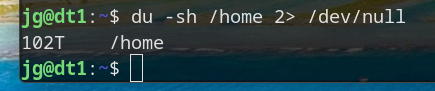
I think I officially have a hoarding problem...
A place to share alternatives to popular online services that can be self-hosted without giving up privacy or locking you into a service you don't control.
Rules:
Be civil.
No spam.
Posts are to be related to self-hosting.
Don't duplicate the full text of your blog or readme if you're providing a link.
Submission headline should match the article title.
No trolling.
Promotion posts require active participation, with an account that is at least 30 days old. F/LOSS without a paywall has exceptions, with requirements. See the rules link for details.
AI-related discussions and AI-involved promotional posts have additional requirements for tagging, as noted in Rule 7 and the AI & Promotional Post Expanded Rules post.
Resources:
Any issues on the community? Report it using the report flag.
Questions? DM the mods!
I think I officially have a hoarding problem...
I was like "nothing wrong here" until I saw that T that my brain just refused to parse the first time.
If I was on my laptop and not my phone I would post a screenshot with a P just for you
lol , is home separate mount point?
Yeah,
So Home is a separate 1.8TB NVME drive... But under home is my home directory, and under that is a half-dozen NAS mounts, including my ~~Plex stuff.~~ collection of ISO images. ;-)
omg. how many isos to get 100tb
If you're doing raw bluray, not as many as you'd think.
Yeah, a single raw blu-ray can be over 100GB. I ripped my whole doctor who blu-ray collection once, it took quite a few days. And that wasn't even 4k or HDR or anything. The first few seasons are even interlaced iirc.
Your username absolutely does not check out. Or your shredder is broken haha
I shred paper. ;-) After digitizing it of course. ;-)
For working I'm a backup and DR guy...the name was intended to be ironic. ;-)
Pfft, the only "hoarding problem" is that storage is expensive these days!
I know, I just paid $500 for a 24TB SAS drive that was $250 just over a year ago.
That's a good deal. Microcenter was selling a WD 20TB external HDD for $600. Didn't end up pulling the trigger 'cause I'm going for a 2 drive Raid1 config on my janky setup and $1350 w/ taxes is way too steep.
I'm reading the command to the tune of Du Hast
Du hast mich. Du hast mich gefragt UND ICH HAB SPEICHERPLATZ
Toller Musik Geschmack!
Pardon my stupidity BUT why include stdout to Devnull? Why not omit and simply 'du -sh /home'
There’s probably a bunch of permissions errors, filesystems warnings for cross-filesystem mounts or links, etc. all going to stderr. Linux output streams are a bit odd, 1 is stdout and 2 is stderr. So the command is redirecting the “noise” to null and just printing the actual command output. That would be my assessment, but OP could probably give a more correct answer..!
Nope, you are exactly on.
Noob, just use sudo, less chars!
Oddly enough, still generates errors. (There are stuff in user directories that are set to 600.... so even root can't browse/open.)
Well now I have to try this. Missing that executable bit would make sense. But last time I did this on / I didn't get errors 🤔
2> means stderr.... Keeps the "can't access ...." Out of the display.
That's stderr, not stdout
Meanwhile here I am trying to upgrade my 512gb NVME drive to 2Tb while also still trying to afford car payments, rent and food. Rookie numbers on my part.
The most well-timed thing I ever did was buy 6 2tb NVMe drives in August last year
God help me if one fails
One think I miss from reddit… /r/datahoarder
These were my people. I probably have 100TB but it certainly isn't in my home directory. I'm not sure if I should be immpressed or freightened.
There's !datahoarder@lemmy.world, !datahoarder@lemmy.ml, and !datahoarder@selfhosted.forum...
EDIT: spelling
never saw the s argument and was curious what's the difference to d. man pages are way ahead of me ^^
--max-depth=0is the same as--summarize
So just did a couple of experiments...
sudo su -sh /home - returns permission denied errors on certain NAS subdirectories, but not a lot.
du -sh /home --summarize -returns the same errors.
du -sh --max-depth=0 - returns the same errors plus an error saying that using --max-depth=0 is the same as --summarize.
;-) for the purposes of what I was doing (creating a clip for posting) redirecting stderr to null was the best option.
But I learned a few things today, which is cool. ;-)
Greetings, fellow data hoarder!
Rookie numbers.
Try that shit on datahoarders and see hoards measured in Petabytes
Jesus...
Bruh
To be fair, all but about 2TB of that is on a NAS...but still.
Why do you pipe stderr of du into /dev/null?
To keep the errors out and provide just the result.
I create videos, and back up all of my raw footage. I make weekly videos, and the size ranges from 50GB up to 500GB or more. I have 105TB available, 90TB used at the moment. I also have a fully redundant set of another 105TB. My employer has unfortunately made it very easy to justify hoarding, as they'll sell me reputable used commercial drives for $10/TB.
The video archives are 53TB
TubeArchivist is 19TB
Legally acquired movies and TV is 10TB
Immich is 2TB
Those are the main users of data. A bunch of other folders are using anywhere from a gig to 500GB, but those are basically rounding errors.
Bob Saget would roll in his grave if he heard about your addiction.
"You ever suck some dick for some HDDs?"
Lately, I'm considering it.
That's an option?