Timely_Jellyfish_2077

joined 2 years ago
 

This only makes sense if you have an iGPU, but hear me out.

My system:

CPU: Intel Core Ultra 7 265K
GPU: AMD Radeon RX 9070
Motherboard: MSI PRO B860-P WiFi
RAM: G.Skill 64GB (32GBx2) DDR5-6000
PSU: Corsair RM850X
OS: Arch Linux KDE

I see people always telling others to connect their monitor directly to the dGPU instead of the motherboard/iGPU. I decided to test this with a wattmeter, and the results were interesting.

Power consumption (whole system):

Connected to dGPU:

Idle at 60/165Hz: 33-35.5W (constantly fluctuating)
YouTube 1080p fullscreen: 73-83W (constantly fluctuating)

Connected to iGPU (motherboard):

Idle at 60Hz: 31.8W
Idle at 165Hz: 32.5W
YouTube 1080p fullscreen: 40-44W (occasionally hitting 50-52W)

Not only while playing youtube , doing any light tasks like opening new tabs, moving windows, browsing, chatgpt, claude etc all these things consume about 25-40W more when connected to dgpu directly. Also the system gets to idle power quickly when connected to igpu. Whereas with dgpu, it takes noticeably longer to drop to lower power levels.

When doing GPU intensive tasks like gaming or running LLMs, the OS (at least on Linux, should be the same on Windows) automatically runs them on the dGPU. I get the same performance, or at worst within margin of error.

So, it makes no sense to connect directly to the dGPU unless you’re only gaming. If you have mixed workloads - work, browsing, movies, youtube AND gaming , then connecting to the iGPU saves significant power without sacrificing performance where it matters.


It feel like we’re losing to Google, day by day. They aren’t killing AOSP directly, but they are making it useless step by step.

Now it’s Google Play Services, Play Integrity checks, installation source checks… more and more apps just refuse to run without GMS. Banking apps? Most of them don’t work. And it’s only getting worse. I run vanilla AOSP on my main profile, no Play Services. I keep GMS only in my work profile for the apps that absolutely need it. But now even some regular apps that don't need any play services won’t work on my main profile anymore. They simply block your from running , like le chat.

Maps is google's most important app there is no way to run without play services. Sure we can use webview or gmaps wv, but they don't provide turn-by-turn directions. Earlier maps used to work without play services, but two years ago, an update stopped it from working. Now that old version is out of date and no longer works.

Google is slowly making GMS very important to run. The problem with GMS is they require to run as system app and has to have all the permissions by default.

Hope EU puts pressure to make google allow apps to run independently without GMS or atleast install them as user apps(like graphene os sandboxed play services).

If we keep going on like this, AOSP can only run fdroid apps in the future.


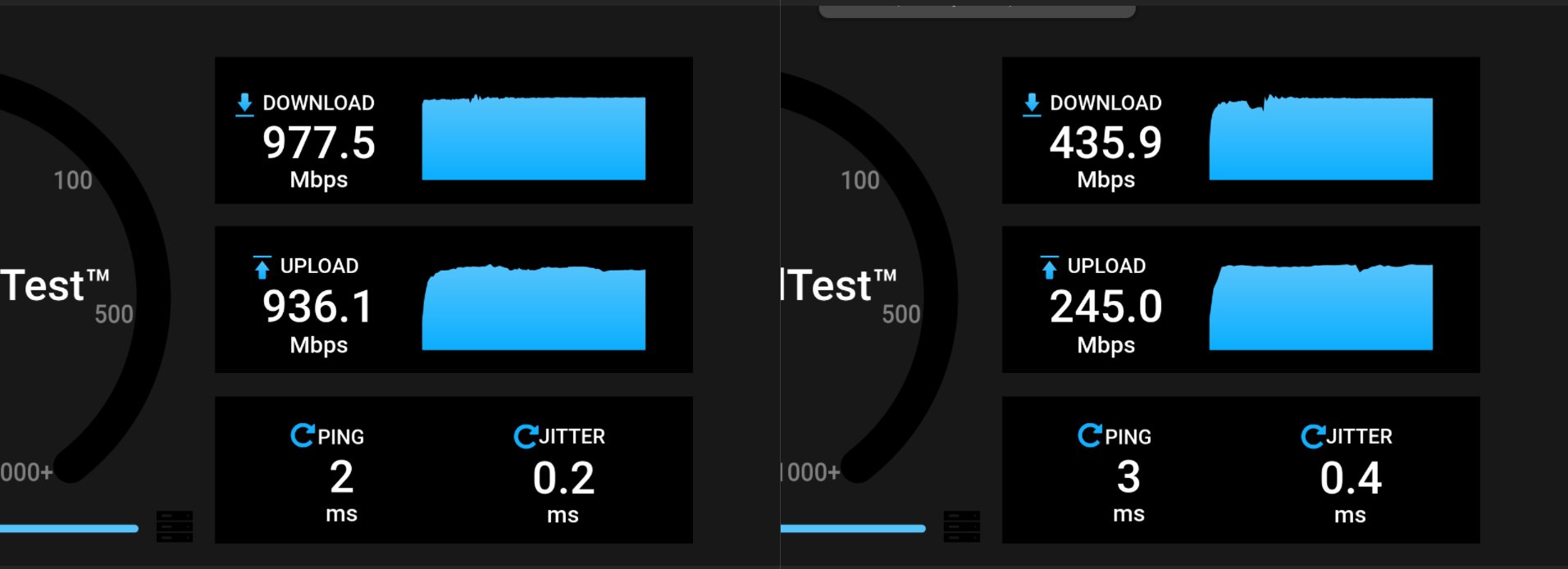
I ran OpenSpeedTest from my PC to my Raspberry Pi 4B, both connected via LAN to my WiFi router. The left screenshot shows the speedtest via local_ip:3000, and I'm getting the expected 1 Gbps up/down.

The right screenshot shows the speedtest via https://speed.mydomain.com/. I'm confident that the connection from my PC to my home server is routed internally and not through the internet because my lowest ping to the nearest Speedtest server (my own ISP) on speedtest.net is 6ms, and my internet speed is 100 Mbps up/down. So the traffic must be routing internally.

Is there typically such a massive difference between using http://local_ip:3000 and https://speed.mydomain.com/?

Additional context: The speedtest server is running via Docker Compose. I'm using Nginx (native, not Docker) to access these services from outside my network.