UninterestingVoid

joined 3 days ago
[–] UninterestingVoid@reddthat.com 1 points 9 hours ago (1 children)

Is the selfstabbing intended?

I was guessing bitlocker was decrypted when you logged in.

[–] UninterestingVoid@reddthat.com 4 points 18 hours ago

or at least to open it with other versions of wine and activate stuff like VKD3D and all that


the tittle probably does not explain well but like as in when the website asks for a kind of app to open an app. I need it for these 2 desktop files:

[Desktop Entry]
Name=Polytoria
Exec=env "WINEPREFIX=/home/shared/wineprefixes/Polytoria" wine "C:\\users\\epik\\AppData\\Local\\Programs\\Polytoria\\Polytoria.exe" %U
Type=Application
StartupNotify=true
Comment=The cross-platform launcher for Polytoria.
Path=/home/shared/wineprefixes/Polytoria/drive_c/users/epik/AppData/Local/Programs/Polytoria
Icon=ACA4_Polytoria.0
StartupWMClass=polytoria.exe
Categories=Game
MimeType=x-scheme-handler/polytoria;
[Desktop Entry]
Name=AmongUsHelper
Exec=env WINEPREFIX=/home/shared/wineprefixes/Amongus2 wine /home/shared/Games/AmongUs/AmongUsItch/'Among Us_Data'/Resources/AmongUsHelper.exe
Type=Application
StartupNotify=true
Comment=Helper to login to AmongUs
Path=/home/shared/Games/AmongUs
StartupWMClass=AmongUsHelper.exe
MimeType=x-scheme-handler/amongus;

But when I try to do it with lutris it just opens the app normally so that's inconvenient. Is there any way to do this?

[–] UninterestingVoid@reddthat.com 2 points 21 hours ago (1 children)

ye sorry

the info tab says:

Operating System: Artix Linux KDE Plasma Version: 6.7.2 KDE Frameworks Version: 6.27.0 Qt Version: 6.11.1 Kernel Version: 7.1.3-artix1-2 (64-bit) Graphics Platform: X11 Processors: 8 × Intel® Core™ i7-8565U CPU @ 1.80GHz Memory: 8 GiB of RAM (7.6 GiB usable) Graphics Processor: Intel® UHD Graphics 620 Manufacturer: HP Product Name: HP ZBook 14u G6

[–] UninterestingVoid@reddthat.com 1 points 23 hours ago

it worked on wintoes

yes but im anxious


artix runit There is no /etc/modprobe.d/alsa.conf or basically, most alsa and pulseaudio config files are missing? When I connect headphones it works fine.

/proc/asound/devices returns: 33: : timer

and that's it. The only place I found anything related to the card is if I do sudo lspci -vv | grep -i audio which returns

00:1f.3 Multimedia audio controller: Intel Corporation Cannon Point-LP High Definition Audio Controller (rev 11) Kernel driver in use: sof-audio-pci-intel-cnl

cat /proc/asound/cards


no soundcards


cat /proc/asound/modules doesn't even give me output.

arecord -l / arecord: device_list:279: no sopacmd list-sourcesundcards found...

and that kind of stuff

pacmd list-sources

1 source(s) available.

  • index: 0 name: <combined.monitor> driver: <module-combine-sink.c> flags: DECIBEL_VOLUME LATENCY DYNAMIC_LATENCY state: SUSPENDED suspend cause: IDLE priority: 1000 volume: front-left: 65536 / 100% / 0.00 dB, front-right: 65536 / 100% / 0.00 dB balance 0.00 base volume: 65536 / 100% / 0.00 dB volume steps: 65537 muted: no current latency: 0.00 ms max rewind: 0 KiB sample spec: s16le 2ch 44100Hz channel map: front-left,front-right Stereo used by: 0 linked by: 0 configured latency: 0.00 ms; range is 0.50 .. 200.00 ms monitor_of: 0 module: 13 properties: device.description = "Monitor of Simultaneous Output" device.class = "monitor" device.icon_name = "audio-input-microphone"

and no other pacmd that i found related gives me anything

pacmd list-cards / 0 card(s) available.

Thanks to anyone that's able to help.

[–] UninterestingVoid@reddthat.com 1 points 1 day ago (1 children)

So the banana was the sole survivor?

[–] UninterestingVoid@reddthat.com 5 points 1 day ago (3 children)

Can we adress how the banana is not dead but just naked? Unless that's their literal skin then they are probably dead.

[–] UninterestingVoid@reddthat.com 2 points 1 day ago* (last edited 1 day ago)

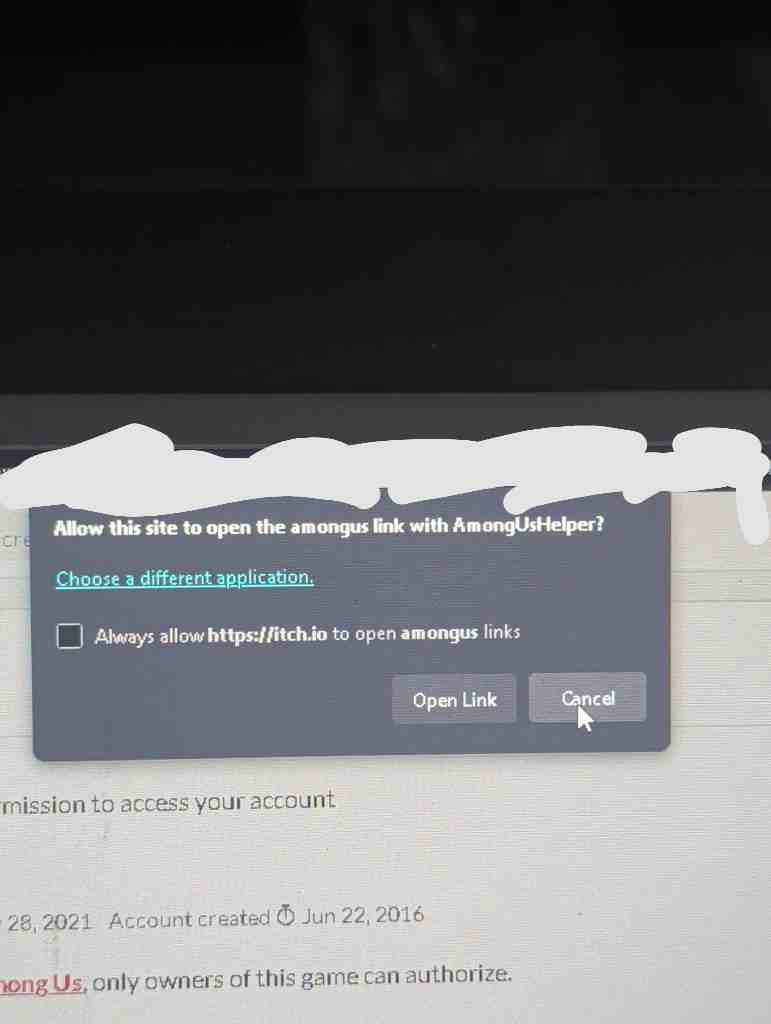
Yea it asks you. after you authorize it to access itchio it asks you this:

But since AmongUsHelper does not work you can't log in, Among Us itself runs fine. but thanks that might be useful in other apps maybe.

if you changed /etc/hosts, it might be that, about the receiving info from the server on this:

I will try that

13
submitted 1 day ago* (last edited 1 day ago) by UninterestingVoid@reddthat.com to c/linux@lemmy.ml
 

I need to open this file right? but it says: 002c:err:winediag:getaddrinfo Failed to resolve your host name IP 0024:fixme:ntdll:NtQuerySystemInformation info_class SYSTEM_PERFORMANCE_INFORMATION

I am using Artix Runit with intel. normally I would say btw but it feels wrong when talking about distros lol. Anyways from what I read the first one is fine apparently and the second one is not. The second one there was something of someone trying to install osu! or something. It didn't say how it got fixed, another person i finally found the solution and said:

https://bbs.archlinux.org/viewtopic.php?id=260142

i finally found the solution big_smile you need to add :

export PATH=/opt/wine-osu/bin:$PATH

(or whatever path you chose when installing wine) before starting the game !

idk what that means. Also the post was on arch forums and like also said something about intel which is idk.

I also found this: https://forum.manjaro.org/t/i-cant-install-the-physx-program-with-wine/164410/2 (it didn't work)

Anyways I was trying to run itchio amongus in here. So it sends me to itchio and it wants to open a link for among us to login in the game. I have the following .desktop file for that:

[Desktop Entry] Name=AmongUsHelper Exec=env wine /home/epik/Games/AmongUs/AmongUsItch/Itch/'Among Us_Data'/Resources/AmongUsHelper.exe Type=Application StartupNotify=true Comment=AmongUsItchio helper Path=/home/epik/Games/AmongUs/AmongUsItch/Itch Icon=ACA4_Polytoria.0 StartupWMClass='AmongUsHelper.exe' MimeType=x-scheme-handler/amongus;

It seems to be fine but the file doesn't open, like I mean if I open it directly.

yea lemmy messes with the paragraphs. I already deleted and remade the wineprefix btw. And reinstalled the game.

It is interesting that the other posts

Operating System: Artix Linux KDE Plasma Version: 6.7.2 KDE Frameworks Version: 6.27.0 Qt Version: 6.11.1 Kernel Version: 7.1.3-artix1-2 (64-bit) Graphics Platform: X11 Processors: 8 × Intel® Core™ i7-8565U CPU @ 1.80GHz Memory: 8 GiB of RAM (7.6 GiB usable) Graphics Processor: Intel® UHD Graphics 620 Manufacturer: HP Product Name: HP ZBook 14u G6

using wine-staging just tells me stuff the init of course., I intalled more optional dependencies and that did nothing.

I have vague memories of the program running but at this point it might be a creation of my imagination.

yea idk I will try more stuff eventually imma just do other stuff for now. If I fix it I will say it here and yea I will also run it on another machine eventually and see if that works.

Anyways if anyone can help thanks and yea.
view more: next ›