christos

joined 3 years ago
[–] christos@lemmy.world 2 points 6 days ago (2 children)

Please elaborate

[–] christos@lemmy.world 2 points 6 days ago

This script can also work with any in this list proxy sites, by editing the config file.


https://gitlab.com/christosangel/corsaro

corsaro is a script written in Bash that allows the user to search for torrents in the terminal .

colors1

The functions and the data are taken from https://piratebay.live/

Opening the script, the user through the main menu, can:

  • Search for a torrent

  • Search for a torrent in a category

  • Search for a torrent in multiple categories

  • Check out top 100 torrents in a category

  • Browse torrents in a category

  • Browse the most recent torrents

  • Repeat previous torrent search

  • Browse torrent search history and repeat a search using a stored key word

  • Configure the parameters of the script


https://gitlab.com/christosangel/corsaro

corsaro is a script written in Bash that allows the user to search for torrents in the terminal .

colors1

The functions and the data are taken from https://piratebay.live/

Opening the script, the user through the main menu, can:

  • Search for a torrent

  • Search for a torrent in a category

  • Search for a torrent in multiple categories

  • Check out top 100 torrents in a category

  • Browse torrents in a category

  • Browse the most recent torrents

  • Repeat previous torrent search

  • Browse torrent search history and repeat a search using a stored key word

  • Configure the parameters of the script


https://gitlab.com/christosangel/corsaro

corsaro is a script written in Bash that allows the user to search for torrents in the terminal .

colors1

The functions and the data are taken from https://piratebay.live/

Opening the script, the user through the main menu, can:

  • Search for a torrent

  • Search for a torrent in a category

  • Search for a torrent in multiple categories

  • Check out top 100 torrents in a category

  • Browse torrents in a category

  • Browse the most recent torrents

  • Repeat previous torrent search

  • Browse torrent search history and repeat a search using a stored key word

  • Configure the parameters of the script
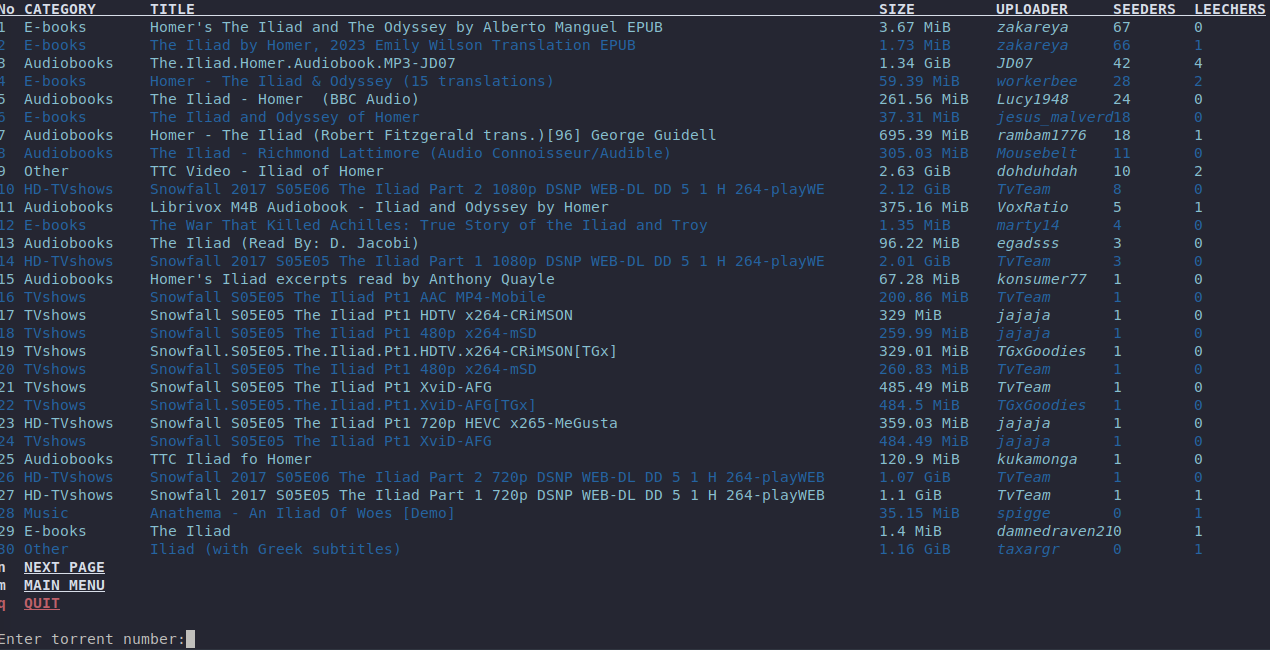
[–] christos@lemmy.world 1 points 1 week ago (1 children)

there is a simple read after the table, so no, it is drawn once. I trid to put a cursor on it, but felt unresponsive and lagging, thus read , kept simple

[–] christos@lemmy.world 2 points 1 week ago (3 children)

No worries, I am just trying to estimate how much I need to truncate the torrent names to be functional for the average user.

Just to give you an idea:

https://media.kafeneio.social/media_attachments/files/117/281/634/809/361/549/original/47c5952c608d5b7a.png

[–] christos@lemmy.world 2 points 1 week ago

Thanks. The ideal should be 140 chars. I will work out truncating the torrent name column in order for everything to fit in 80 char terminals, although it would not be very functional.

[–] christos@lemmy.world 1 points 1 week ago (5 children)

I appreciate the time you dedicated to answer. I was hoping for a number as an answer to a simple question.

[–] christos@lemmy.world 1 points 1 week ago

Thx, if many users respond with less than 140, I will need to find a solution involving truncating strings and using tput cols

[–] christos@lemmy.world 1 points 1 week ago (7 children)

There are torrent variables that need to be shown in a row: category, date, name, size, uploader, seeders and leechers. This not plausiblel in 80x25, thus the question for fullscreen.


A simple question with an easy answer: how many characters long is your terminal in full screen? I am working on a torrent searching script, and I am interested in the statistical max dimensions of a terminal. Thanks in advance.

[–] christos@lemmy.world 2 points 3 months ago (1 children)

This bug is now fixed, its origin was escape code parsing while using the arrow keys: looped three times before getting the input. You can update the script to get the improved version. As I said, it is now fixed, plus the max level of disks is up to 13.

Recursion until hell freezes over.

[–] christos@lemmy.world 2 points 3 months ago

I have just updated the script, now up to 13 disks available (optimal moves: 8191).

It will take a while to solve it...

[–] christos@lemmy.world 3 points 3 months ago (2 children)

I don't know, it is not often that I use exp in writing, however:

$ echo $((2**9-1))
 

cross-posted from: https://lemmy.world/post/47988648

https://gitlab.com/christosangel/hanoi

Hanoi is a simple terminal version of the known classical game Tower of Hanoi, written in Bash.

During the game, the user can move left and right, pick disks and drop them in other stacks.

The aim is to move all the disks from the ORIGIN pile to the DESTINATION pile, in as little moves as possible

hanoi.png


cross-posted from: https://lemmy.world/post/47988648

https://gitlab.com/christosangel/hanoi

Hanoi is a simple terminal version of the known classical game Tower of Hanoi, written in Bash.

During the game, the user can move left and right, pick disks and drop them in other stacks.

The aim is to move all the disks from the ORIGIN pile to the DESTINATION pile, in as little moves as possible

hanoi.png


cross-posted from: https://lemmy.world/post/47988648

https://gitlab.com/christosangel/hanoi

Hanoi is a simple terminal version of the known classical game Tower of Hanoi, written in Bash.

During the game, the user can move left and right, pick disks and drop them in other stacks.

The aim is to move all the disks from the ORIGIN pile to the DESTINATION pile, in as little moves as possible

hanoi.png


https://gitlab.com/christosangel/hanoi

Hanoi is a simple terminal version of the known classical game Tower of Hanoi, written in Bash.

During the game, the user can move left and right, pick disks and drop them in other stacks.

The aim is to move all the disks from the ORIGIN pile to the DESTINATION pile, in as little moves as possible

hanoi.png


cross-posted from: https://lemmy.world/post/7753968

https://gitlab.com/christosangel/turnip-tv

turnip-tv is a customizable tui iptv client, written in Bash.

The user can (among other customizations) choose input program between

  • read

1read.png

  • fzf

1fzf.png

  • rofi

1rofi.png

  • dmenu

1dmenu.png


This script was inspired by and is almost identical with another project called radion, which is a tui internet radio client.

The channel list was found here, and was modified to fit the script's functionality.

 
view more: next ›