juliakafarska

joined 3 months ago
[–] juliakafarska@programming.dev 1 points 32 minutes ago (1 children)

Yes, it stands for Integrated Cloud Environment. Why?


Originally published at https://blog.light-cloud.com/cloud/rethinking-infrastructure on the Light Cloud Blog.

By Julia, Light Cloud

Summary: When I need to deploy a Node.js API with a Postgres database, I shouldn't need to understand VPCs, subnets, security groups, IAM roles, RDS parameter groups, and 47 other concepts.

Why I Sacrificed a Goat to AWS gods

Last week, I spent 14 hours debugging a Kubernetes networking issue. Fourteen. Hours. The problem? A race condition where pods were starting before the service mesh sidecar was ready, causing intermittent 503 errors that only happened under load, only in production, and only about 30% of the time. By the time I found it (buried in the Envoy proxy logs that I had to enable debug mode to even see), I'd gone through three Stack Overflow rabbit holes, two GitHub issues from 2019, and consumed enough caffeine to kill a small horse.

I'm a developer. I write code. I solve business problems. But somehow, I've become an accidental infrastructure expert, and honestly? I'm exhausted.

We've come so far in abstracting complexity in software development. Remember managing memory in C? Now we have garbage collection. Remember writing assembly? Now we have Python. Yet here I am, in 2025, writing YAML files that would make a Victorian novelist jealous with their verbosity, just to deploy a simple web app.

What if infrastructure worked more like Lego blocks? You know, those satisfying clicks when pieces snap together perfectly? Instead of the box of loose screws and that IKEA manual that seems to be missing page 3?

The Problem: We're Building at the Wrong Level of Abstraction

Here's a fun exercise: try explaining to a non-technical friend what you need to do to deploy a Node.js API with a Postgres database on AWS. Go ahead, I'll wait.

Did you get to the part about VPCs? How about security groups? IAM roles? RDS parameter groups? Did their eyes glaze over around the time you mentioned "availability zones"?

That's the problem right there. I'm being forced to think about stuff that has nothing to do with my actual application. It's like requiring every driver to understand internal combustion engines before they can use a car. Sure, it's useful knowledge, but is it necessary? Really?

The cloud providers are giving me atoms-EC2 instances, S3 buckets, networking rules-when what I need are molecules. Hell, I'd settle for some basic compounds at this point. I don't care about your 47 different instance types. I care about my API responding to requests and my data being stored safely.

The abstraction gap is killing my productivity. On one end, there's my application code-the thing I'm actually good at, the thing I was hired to write. On the other end, there's raw infrastructure-the thing that keeps me up at night. And bridging them? A mountain of YAML files, bash scripts, and whatever dark magic Terraform is doing behind the scenes.

The Philosophy: Cloud Infrastructure as Composable Building Blocks

Okay, so here's the thing-I don't want infrastructure to disappear completely. I get it, it's important. What I want is for it to be packaged into chunks I can actually use without needing a PhD in distributed systems.

Think about it like cooking. I don't want to grow my own wheat, mill it into flour, cultivate yeast, and then make bread. But I also don't want bread to magically appear-I want to buy flour, yeast, and salt, then make the bread. That middle ground? That's where we need to be with infrastructure.

The traditional approach goes like this: "Here's an EC2 instance. Now install Docker, set up a load balancer, configure auto-scaling, set up monitoring, create a CI/CD pipeline, sacrifice a goat to the AWS gods, and maybe your app will run."

What I actually want: "Here's a 'Web Service' block. It has everything a web service needs. Here's a 'Database' block. Snap them together. Done."

These blocks aren't magic-they're just pre-configured infrastructure with sensible defaults:

  • The Web Service block comes with HTTPS (because it's 2025, not 1995), load balancing, auto-scaling, and even a CI/CD pipeline
  • The Database block includes backups (because who hasn't forgotten to set up backups?), encryption, and connection pooling
  • The Monitoring block just... monitors things. Without me learning Prometheus query language
  • The Network block sets up all that VPC nonsense following actual security best practices

I can peek inside these blocks if I want. I can tweak them if needed. But most of the time the defaults just work, because someone who actually enjoys this stuff has already made the hard decisions for me.

Building Blocks That Match How We Think

The platforms that are getting this right aren't trying to revolutionize everything. They're just packaging infrastructure in a way that makes sense to those of us who'd rather be writing features than fighting with kubectl.

Look at what these blocks actually provide:

  • Web Service Block: It's not just a server. It's a load balancer, auto-scaling group, container orchestration, AND a complete CI/CD pipeline. When I push code, it builds, tests, and deploys. I didn't set any of that up.
  • Database Block: A managed database with automated backups, read replicas, connection pooling, and even migration tools. Remember spending days setting up MySQL replication? Yeah, me neither anymore.
  • Scheduled Task Block: Cron jobs that just work. No Lambda functions to manage, no servers to provision. Just "run this code every day at 3am."
  • Queue Block: Message queuing with dead letter queues, retry logic, and actual useful monitoring. Not just CloudWatch logs that tell me nothing.
  • CDN Block: Static files served fast, with image optimization and deploy previews. Because waiting 30 seconds for images to load is so 2010.

These aren't just thin wrappers around AWS services. Someone has made architectural decisions, implemented best practices, and hidden all the sharp edges. It's opinionated infrastructure, and thank god for that.

The Developer Experience Revolution

You know what makes me happy? This:

git push origin dev

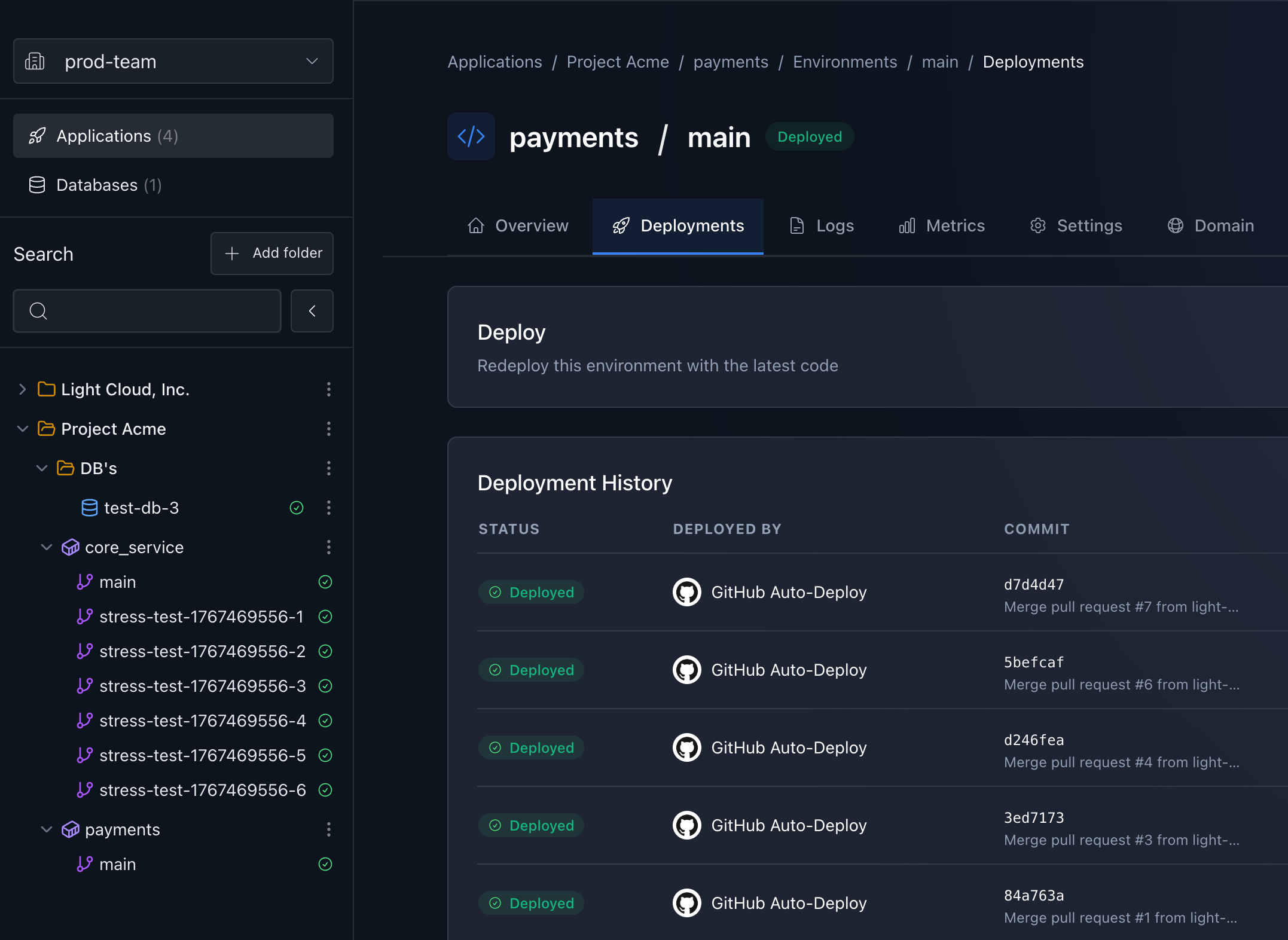
And then, two minutes later, my code is running in my dev environment. Another developer reviews it, approves the PR, and it automatically rolls out to staging. Tests run, everything passes, and with one click (or auto-promotion if you're feeling brave), it's in production. Not because I'm reckless, but because the infrastructure block includes the entire deployment pipeline with proper environments baked in.

The Web Service block I'm using isn't just a place to run code. It includes:

  • Git integration that watches my repo and understands branches (main -> staging -> production)
  • Build pipelines that create proper environments, not just one big YOLO deployment
  • Test runners that actually run my tests in each environment
  • Progressive deployment strategies (dev first, then staging, then prod-like adults do it)
  • Rollback mechanisms for when things break in staging before they hit production
  • Environment-specific configs and secrets that just work

I didn't configure any of this. It came with the block. Someone who actually understands CI/CD and has been burned by enough production incidents built it once, packaged it up, and now thousands of developers like me can use it without accidentally taking down production on a Friday afternoon.

Meanwhile, in the traditional world, here's my old deployment checklist:

  1. Write a Dockerfile (and hope it's secure)
  2. Build and push to a container registry
  3. Write Kubernetes deployment YAML (minimum 200 lines)
  4. Configure service mesh (what even is Istio?)
  5. Set up ingress controller (nginx? traefik? who knows?)
  6. Configure TLS certificates (Let's Encrypt, but make it complicated)
  7. Set up monitoring and alerting (Prometheus + Grafana + ∞ configuration)
  8. Configure log aggregation (ELK stack? Fluentd? Help)
  9. Write Helm charts (YAML generating YAML, what could go wrong?)
  10. Debug why none of this works
  11. Find out it's DNS. It's always DNS.

The Hidden Cost: Cognitive Load

Let's talk about the real cost here. It's not the AWS bill (though that's painful enough). It's the mental overhead.

Every piece of infrastructure I have to manage is taking up space in my brain. Space that could be used for actual problem-solving. Instead, I'm remembering which security group allows traffic on port 443, or why RDS snapshots are failing, or what that CloudFormation template from 2022 actually does.

Traditional cloud makes me think like a capacity planner from the 90s. How many instances do I need? What size? Should I use reserved instances? Spot instances? What about Savings Plans? It's like being asked to predict the future, except the penalty for being wrong is either wasted money or a crashed website.

With these infrastructure blocks, scaling just... happens. The Web Service block scales down to zero when nobody's using my app at 3am (saving money), and scales up when we get featured on Hacker News (saving my job). I pay for what I use, not for what I might need during that one traffic spike we get every Black Friday.

But honestly? The money isn't even the biggest win. It's that I've stopped waking up at 3am worried about infrastructure. I'm back to waking up at 3am worried about actual bugs in my code, which is... progress?

The Shift Is Already Happening

This isn't just me ranting into the void (though there's some of that). The entire industry is moving in this direction.

New-Generation Platforms

Companies are building infrastructure platforms from scratch with these principles baked in. They looked at what developers actually build-web apps, APIs, background jobs-and created blocks that map directly to these concepts. No translation layer needed.

The Giants Are Catching On

Even AWS is getting the message. Services like App Runner, Amplify, and CDK are basically admission that their own platform is too complex. Google has Cloud Run, Azure has Container Apps. They're all trying to put a simpler face on their incredibly complex backends.

The irony? Even these "simple" services are wrapped in the same old complexity. You still need IAM roles, VPCs, and seventeen different service quotas. It's like putting a nice UI on a nuclear reactor control panel-prettier, but still terrifying.

Infrastructure as Code, But Make It Simple

The real revolution is happening with tools that generate all that complex configuration from simple, high-level descriptions. I write ten lines describing what I want, and these tools generate the thousand lines of CloudFormation I never want to see. It's like having a really smart intern who actually knows what they're doing.

What This Means for Architecture

When infrastructure becomes this simple, it changes how we build applications. And I mean that in a good way.

We can build at the right scale. Whether you're building microservices or a modular monolith, deployment complexity isn't driving your architecture decisions anymore. You choose the architecture that makes sense for your problem, not the one that's easiest to deploy.

Vertical scaling is fine, actually. Let the platform figure out when to scale up vs. scale out. That's computer science stuff. I've got business logic to write.

Boring technology wins. When the infrastructure complexity is handled, you can use boring, proven technology for your application. Postgres, Redis, maybe some queues. Nothing fancy. It just works.

We can experiment again. When spinning up a new service takes minutes instead of days, you try more things. That crazy idea for a feature? Let's prototype it. If it doesn't work, we tear it down. No harm done.

Code quality becomes the focus. When infrastructure isn't the bottleneck, we can actually focus on writing good code. Proper tests. Documentation. Code reviews that aren't just "LGTM" because everyone's too tired from fighting Kubernetes.

The Trade-offs (But They're Actually Benefits)

Okay, let me be honest about the trade-offs. Except... most of them aren't really trade-offs?

More flexibility, not less. These blocks are composable. I can swap out a Postgres block for a MongoDB block. I can add a Redis block for caching. I can modify the default configurations when I need to. Try doing that with a hand-rolled Kubernetes setup without breaking everything.

Less vendor lock-in. Wait, what? Yeah, seriously. These blocks use standard cloud services under the hood. The Web Service block might use ECS on AWS, Cloud Run on Google, or Container Apps on Azure. My code doesn't care. The abstraction means I can move between clouds easier than if I'd built directly on their proprietary services.

Lower costs at scale. This one surprised me too. Turns out, when infrastructure experts build these blocks, they include all the cost optimizations I would never have figured out. Spot instances? Automatic. Reserved capacity discounts? Built-in. Right-sizing? Constantly happening. My AWS bill went down 40% after switching to blocks because they're better at cloud economics than I'll ever be.

The only real trade-off? Edge cases. If you're doing something truly weird-like running a custom kernel module or needing specific network packet routing-these blocks might not cover it. But they handle 99% of use cases. And honestly? If you're in that 1%, you probably have the expertise (and budget) to build custom infrastructure anyway.

The Future: Infrastructure That Disappears

Here's what I think is going to happen: infrastructure is going to become boring. And that's exactly what we need.

Think about electricity. When was the last time you thought about voltage regulators or power grid load balancing? You plug things in, they work. That's where we're heading with cloud infrastructure.

The progression is pretty clear:

  • 2000s: Racking physical servers (dark times)
  • 2010s: Managing virtual servers (getting better)
  • 2020s: Managing containers and orchestrators (wait, this is more complex)
  • Soon: Managing applications with infrastructure blocks (finally!)
  • Future: Just writing code (the dream)

Each step should remove complexity, not add it. We took a detour with containers and Kubernetes-powerful tools that somehow made things more complicated for the average developer. These infrastructure blocks are course-correction.

This Is Our Lego Moment

Remember when you had to manage your own memory in C? When garbage collection became mainstream, a whole generation of developers could suddenly focus on building features instead of tracking down memory leaks. We're more productive not because we're smarter, but because we're not wasting brain cycles on solved problems.

That's what these infrastructure blocks represent. They're not dumbing down infrastructure-they're packaging it in a way that respects my time and mental energy. They're acknowledging that most of us just want to build and ship products, not become Kubernetes administrators.

The cloud revolution promised that we wouldn't have to think about servers. Fifteen years later, I'm thinking about servers more than ever, just virtual ones with more configuration options. These building blocks are finally delivering on that original promise.

I don't want to be an infrastructure expert. I want to be a developer who ships features that users love. I want to spend my time solving business problems, not debugging network policies. I want infrastructure that just works, so I can focus on the code that makes my application unique.

Stop making me think about VPCs. Stop making me configure load balancers. Stop making me write YAML files longer than my actual application code.

Just give me blocks I can snap together. Let me build.

Related reading


This article first appeared on the Light Cloud Blog: https://blog.light-cloud.com/cloud/rethinking-infrastructure.

 

Originally published at https://blog.light-cloud.com/startup/cloud-out-of-spite on the Light Cloud Blog.

By Julia, Light Cloud

Summary: After spending the GDP of a small nation on AWS and losing what remained of my sanity to YAML files, I did what any reasonable developer would do: I started a company to fix it.

So I Started a Cloud Company Out of Spite

Remember that 14-hour Kubernetes debugging session I mentioned? The one where I fixed a race condition that AWS's own documentation said "shouldn't happen"? Well, after implementing the fix that three different AWS architects couldn't figure out, I thought I'd won.

Then our monthly AWS bill arrived: $4,847.

Not because we did anything wrong. We followed every "best practice." We used their recommended architecture. Auto-scaling groups? Check. Multi-AZ deployment? Check. Read replicas? Check. We built it exactly how the AWS Solutions Architect would.

The app was handling 10k requests per day. The infra could handle 10 million. We were paying for a Ferrari to deliver pizza.

That's when I snapped. Not like a normal person who might take up yoga or start a garden. No, I did what any sleep-deprived, caffeine-addicted developer would do: I decided to start a cloud infrastructure company.

My therapist says it was a "trauma response." I prefer to call it "entrepreneurship."

The Exact Moment Light Cloud Was Born

Picture this: It's 4 AM. I'm sitting in my underwear, surrounded by empty energy drink cans, staring at a CloudFormation template that's 1,847 lines long.

I turned to my rubber duck (yes, I debug with a rubber duck, don't judge) and said: "What if infrastructure just... worked?"

The duck said nothing, which I took as agreement.

That night, I wrote a manifesto on a napkin. Well, actually it was on my iPad, but "napkin" sounds more startup-y. It said:

INFRASTRUCTURE SHOULD BE:

  1. Like LEGO blocks..
  2. Not require a PhD in Computer Science
  3. Just F***ing Work
  4. Cost less than a car payment
  5. Deploy in under 2 minutes

Two weeks later, Light Cloud, Inc. was... well, not born exactly. More like conceived. In a very preliminary, "this might be a terrible idea but let's try it anyway" kind of way.

My Friend Alex (Or: The $18,000 Quote That Changed Everything)

You can start a company alone. But you still need someone to rant to when things go wrong.

Alex and I had been friends for years. She's a non-technical entrepreneur in California who'd watched me descend into infrastructure madness from 9 time zones away. Our friendship survived on WhatsApp rants and video calls where I'd explain why I was still awake at 3 AM fighting with AWS.

Then one day, she called me. "Julia, I just got a $18,000 quote from a software agency to deploy my platform. They're saying it needs something called Load balancer, Kubernetes and.. I forgot. Isn't that the thing you're cursing at?"

She went through three development agencies already. Each one spoke a different language... microservices, serverless, container orchestration. All she wanted was for her clients to log in and use her platform.

Over a very pixelated Google Meet call (because of course my internet chose that moment to act up), I showed her my napkin manifesto about infrastructure blocks. She didn't understand the technical details-and that was exactly the point.

"Wait," she said, her video freezing mid-gesture. "You're telling me this could make it so normal people like me don't have to learn what a load balancer is?"

"That's the idea."

"Julia! You need to build this. You know the technical nightmare, and normal people like me are begging for a way out of it," she said while laughing.

She wasn't wrong. My idea of small talk is discussing database indexing strategies. Alex can actually have a conversation without mentioning Git commits. It's a superpower I don't possess.

And that's how a WhatsApp rant turned into an actual plan. Alex became my unofficial reality check-every idea got stress-tested on someone who doesn't know what a load balancer is. Our call schedule is a constant negotiation between PST and CET, but it works.

The MVP That Actually Works

Here's what nobody tells you about building a cloud platform: you need... a cloud platform to build your cloud platform. It's like needing experience to get a job that gives you experience. It's turtles all the way down.

I spent two weeks building our first proof of concept. Then another month turning it into an actual demo that doesn't crash when you look at it wrong. We can now deploy a real app with a database in few minutes. It works with Node.js and even PHP (because someone has to love PHP).

Is it production-ready? God no. But it works well enough that we can show it to people without praying to the demo gods.

The breakthrough came when we showed it to a CTO who's also a cloud architect-the kind of person who's forgotten more about AWS than I'll ever know. We were expecting her to tear it apart.

Instead, she sent us a message: "I got you ;) finally a way to put the personal brand at work for a cool project! I absolutely love the name of the company and the concept you are trying to build. I really believe it has potential!!!"

When someone who's actually built infrastructure at scale wants to be your advisor just because she believes in the project? That's when we knew we might not be completely delusional.

Having her in our corner-someone who gets both the technical complexity and sees why our simple approach could work? That changed everything.

Well, mostly not delusional.

Why "Light Cloud"? (The Naming Marathon)

Naming a company over video calls with a 9-hour time difference is special kind of hell.

We went through dozens of names:

  • CloudSnap (taken)
  • EasyDeploy (sounds like a disease)
  • ServerLess (literally the opposite of what we do)
  • InfraBlocks (meh)
  • YAMLBegone (Alex couldn't stop laughing)
  • DeployBoy (just... no)

After weeks of this torture, at 2 AM my time, 5 PM her time, both of us exhausted for different reasons, I had a moment of clarity: "We just want to make the cloud lighter. Like, less heavy. Light... Cloud?"

Alex went quiet for a second, then started laughing. "That's either brilliant or we're both too tired to think straight. Wait—it works on multiple levels. Light as in not heavy, light as in illuminating the black box of infrastructure, light as in fast..."

We sat in video call silence for 30 seconds (which feels like 3 hours on a call). Then I checked the domain. Available.

"That's a sign," I said.

"Or we're both too tired to think straight," she replied.

I bought it anyway. The domain alone cost $1,200. That's when I learned my first lesson about starting a company: everything costs more than you think.

What's Next?

Look, I know what you're thinking. Two people, no funding, competing with tech giants-what could possibly go wrong?

Everything. Everything could go wrong.

But here's the thing: every big company started with someone stupid enough to think they could fix a problem everyone else accepted as "just how things are." AWS started because Amazon needed better infrastructure. Stripe started because two brothers were tired of payment integration hell.

We're starting Light Cloud because we're tired of infrastructure complexity hell.

In six months, we might be another failed startup statistic. Or we might be the reason you deployed your last app without writing a single line of YAML. We might be the reason a non-technical founder finally launched their idea without spending their kid's college fund on AWS consultants.

The prototype is rough. The business plan is basically non-existent. We're running on caffeine, spite, and the stubborn belief that infrastructure doesn't have to be this hard.

But we have something AWS doesn't: we remember what it's like to be a developer who just wants to ship code. We remember the frustration, the 3 AM debugging sessions, the moment you realize your AWS bill is higher than your salary.

We're building Light Cloud for every developer who's ever wanted to throw their laptop out the window after reading Kubernetes documentation. For every founder who's been quoted the GDP of a small country just to deploy a simple app. For everyone who thinks "there has to be a better way."

There is. We're building it. It's held together with shell scripts and prayers right now, but we're building it.

Join us on this ridiculous journey. Sign up for our waitlist at light-cloud.com. Follow our progress (or spectacular failure) as we try to make infrastructure boring.

Because if two sleep-deprived people working across 9 time zones can make deployment simple, imagine what we could do with actual resources. Imagine a world where "deploy to production" doesn't trigger PTSD. Imagine never having to explain to a client why hosting their simple website costs more than their car payment.

That's the world we're building. One infrastructure block at a time.

Will we pull it off? Come back in six months and find out.

But I'll tell you this: we're going to give it everything we've got. Because the alternative-accepting that this is just how infrastructure works, is unacceptable.

The cloud should be light. Simple. Accessible.

And maybe, just maybe, what this industry needs is exactly what we're building-a fresh perspective from people who understand both the technical complexity and the business reality of modern software deployment.

The learning curve has been vertical. Incorporating a company across two countries? Stock options when you have no idea what your company is worth? Every day brings a new thing we didn't know we didn't know.

But that's what makes this exciting. We're not just building a product-we're learning how to build a company. And if we can figure out Delaware C-Corps and vesting schedules, we can definitely figure out how to make infrastructure simple.


P.S. - Seriously though, if you know anyone who's as frustrated with cloud complexity as we are, send them our way. We're building a community of people who believe infrastructure should just work. Even if we fail, at least we'll fail together.

Related reading


This article first appeared on the Light Cloud Blog: https://blog.light-cloud.com/startup/cloud-out-of-spite.


Originally published at https://blog.light-cloud.com/startup/cloud-bill-horror-story on the Light Cloud Blog.

By Julia, Light Cloud

Summary: I went to sleep that night feeling like I'd conquered the cloud. Look at me, I thought, debugging infrastructure that AWS architects couldn't fix. I'm basically a DevOps deity now. Oh, sweet summer child.

The Arrival of the AWS Bill. Oil on canvas.

Remember that $4,847 AWS bill I mentioned? The one that made me start a cloud company out of pure spite? Well, today I want to tell you the full story. Get comfortable. Pour yourself something strong. You're going to need it.

Act I: The Innocence (Day 1-15)

It started innocently enough. We needed to deploy our microservices architecture. The kind that every "modern" startup runs. Kubernetes, service mesh, the works. We were following AWS best practices to the letter.

The AWS Cost Calculator said it would be $487/month. Reasonable! I even added a 50% buffer because I'm not an idiot. Budget: $750/month. Leadership approved. We deployed.

Everything was perfect. The pods were orchestrating beautifully. Istio was doing its service mesh magic. Auto-scaling worked like a dream. CloudWatch metrics looked like a cardiogram of a marathon runner - steady, healthy, exactly what you want to see.

Sure, I'd already spent 14 hours debugging that Kubernetes networking issue - you know, the race condition where pods were starting before the service mesh sidecar was ready? The one causing intermittent 503 errors that only happened under load, only in production, and only 30% of the time? The one buried in Envoy proxy logs that required debug mode to even see?

But I fixed it! Three AWS architects couldn't figure it out, but I did. Their own documentation said it "shouldn't happen," but there I was at 4 AM, proving their documentation wrong and patching their recommended architecture.

I went to sleep that night feeling like I'd conquered the cloud. "Look at me," I thought, "debugging infrastructure that AWS architects couldn't fix. I'm basically a DevOps deity now."

Oh, sweet summer child.

Act II: The Confusion (Day 16-29)

Week three is when things got... interesting.

First, there was the NAT Gateway. Did you know AWS charges you $0.045 per hour PLUS $0.045 per GB of data processed? Neither did I. That little detail wasn't in the pricing calculator. Our microservices were chatting with each other like teenage girls at a sleepover. Every. Single. Request. Through. The. NAT. Gateway.

Cost so far: +$340.

Then there were the CloudWatch logs. Apparently, AWS charges you to store logs. And to query them. And to... exist near them? I'm still not sure. All I know is that our detailed debugging logs (you know, the ones that saved us during that production incident) cost us $189.

But wait, there's more! Remember those database backups? The automated ones that AWS enables by default "for your protection"? Yeah, they're not free. And neither is storing them. Or transferring them to another region for "disaster recovery" (another default setting).

Cost: +$276.

My favorite discovery was "cross-AZ data transfer." See, we deployed across multiple availability zones for high availability. AWS recommended it! What they didn't mention with the same enthusiasm was that every byte of data moving between zones costs money. Our distributed cache was basically playing ping-pong with $100 bills.

Cost: +$412.

By day 29, I was checking the billing dashboard every 3 hours like a hypochondriac checking WebMD. The number kept climbing. $2,100... $2,300... $2,500...

"It's fine," I told myself, downloading my 47th billing report CSV. "I just need to understand it better."

Narrator: She did not understand it better.

Act III: The Reckoning (Day 30)

The final bill arrived at 12:01 AM on the first of the month. I was awake, naturally, because who needs sleep when you're about to find out if you still have a job?

Total: $4,847.23

I stared at the screen. Refreshed the page. Cleared my cache. Logged out and back in. Tried incognito mode. The number didn't change.

The billing breakdown was 73 pages long. SEVENTY. THREE. PAGES.

I found charges for things I didn't know existed:

  • "EBS Optimized Instance Hours" ($89)
  • "Regional Data Transfer - US East to US East" (HOW IS THAT REGIONAL? $156)
  • "Elastic IP Address - Idle" (IT WAS ATTACHED THE WHOLE TIME! $43)
  • "S3 Select - Data Scanned" (I NEVER USED S3 SELECT! $67)
  • "AWS Config - Configuration Items Recorded" (WHAT? $231)

My favorite line item: "EC2-Other" for $897.

Other? OTHER?!

That's like getting a restaurant bill that says "Food and... stuff - $897."

The Moment Everything Changed

At 3 AM, after creating my 15th spreadsheet trying to reverse-engineer AWS's billing logic, I had an epiphany. Well, first I had a mental breakdown. Then I had an epiphany.

The cloud providers don't want you to predict costs.

Think about it. When was the last time AWS made billing simpler? They have machine learning services that can detect hot dogs in images with 99.7% accuracy, but they can't tell you how much your infrastructure will cost next month?

They have "Cost Explorer" (explore = get lost), "Cost and Usage Reports" (1,000 columns of CSV hell), and "Trusted Advisor" (which advised me to spend MORE money for "optimization"). But not a single tool that says: "Hey, if you keep doing what you're doing, this is what you'll pay."

It's like a taxi with no meter, driving you around the city, occasionally mentioning they charge for breathing their air, and you find out the total when you arrive. Surprise! You owe them your firstborn.

Enter ICE: The Price Revolution Nobody Saw Coming

This is why Light Cloud's ICE (Integrated Cloud Environment) isn't just another infrastructure tool. We built something that should have existed from day one: AI-powered price prediction that actually works.

Here's the revolutionary idea (prepare to have your mind blown): What if you knew how much things would cost BEFORE you deployed them?

I know, I know. Crazy talk.

ICE watches your infrastructure patterns. It learns your traffic patterns, your scaling behaviors, your actual usage. Then it does something magical: it tells you the truth.

"Based on your current setup and last 30 days of patterns, next month will cost $1,247 +/- $50."

No 73-page bills. No "EC2-Other." No surprise NAT Gateway charges that cost more than your car payment. Just a number. A real number. That you can actually budget for.

But here's where it gets interesting. ICE doesn't just predict costs-it actively prevents bill shock:

  • Real-time cost alerts: "Hey, that new feature you just deployed? It's going to add $400/month. Want to reconsider?"
  • Architecture suggestions: "Move this service to a different zone and save $200/month with zero performance impact."
  • The 'Oh Shit' button: Instantly throttle non-critical services when you're approaching budget limits.

We even built in what we call "Cost Comedy Mode" where ICE translates AWS billing items into plain English:

  • "Regional Data Transfer" -> "AWS is charging you for packets taking a vacation"
  • "NAT Gateway Hours" -> "Your private cloud rent (yes, on top of the other rent)"
  • "EC2-Other" -> "¯\(ツ)/¯ Even we don't know"

The Psychology of Cloud Pricing (Or: How They Get You)

You know what's genius about cloud pricing? It's death by a thousand paper cuts. No single charge is outrageous enough to make you rage quit. It's $0.02 here, $0.10 there, $0.0001 per request...

It's like being nibbled to death by ducks. Each duck is adorable and harmless. But suddenly you're surrounded by 10,000 ducks and your credit card is maxed out.

Let me show you the madness across different providers. Here's what I discovered after spending 48 hours creating the world's most depressing spreadsheet:

The Great Cloud Pricing Mystery Tour

Service AWS Google Cloud Azure What You Actually Need
Basic VM (2 vCPU, 8GB RAM) ~$69/month ~$62/month ~$70/month A $20 VPS
NAT Gateway $45/month + $0.045/GB $0.045/GB (no hourly fee!) $0.045/hour + data Your tears
Load Balancer $25/month + $0.008/GB $18/month + $0.008/GB $23/month + complex math nginx for free
Bandwidth (1TB out) $90 $120 $87 Emotional damage
Database (Basic, 2vCPU, 8GB) ~$115/month ~$98/month ~$120/month PostgreSQL on Docker: $0
Logging (100GB) $50 + query costs $45 + analysis fees $55 + "ingestion" grep and prayer
Snapshots/Backups (500GB) $25/month $20/month $24/month But wait, there's more!
"Support" (aka Reading Docs) 10% of bill minimum $100 $150 flat or 9% of bill $100-$1000/month Stack Overflow: Free
Mystery Charges "EC2-Other" "Compute Engine-Other" "Virtual Machines-Misc" ¯\(ツ)/¯
Total for Basic Setup ~$429 + surprises ~$413 + confusion ~$444 + complexity Bankruptcy

But here's the best part - these are just the PREDICTABLE costs. Then there are the surprise guests:

AWS Surprise Charges:

  • Cross-AZ data transfer (because your data took a vacation)
  • S3 API requests (yes, looking at your files costs money)
  • "Elastic IP - Idle" (you pay for NOT using something)
  • CloudWatch "detailed monitoring" (enabled by default, naturally)

Google Cloud Plot Twists:

  • Sustained use discounts that aren't really discounts
  • Network egress to Google services (but not all of them)
  • "Premium" vs "Standard" network tiers (guess which is default)

Azure's Special Moments:

  • "DTU" pricing for databases (what's a DTU? Nobody knows!)
  • Bandwidth pricing that requires a mathematics degree
  • Storage transactions (every file operation = ka-ching!)

The funniest part? Each provider has a "pricing calculator" that's about as accurate as a weather forecast for next year. You put in your requirements, it spits out a number, and then your actual bill is 3-10x higher. It's like they're using random number generators but with a strong bias toward "more expensive."

They've gamified spending money. Every new service, every feature flag, every checkbox in the console is another micro-transaction. It's the enterprise version of a mobile game where you accidentally spend $500 on gems.

And the worst part? They make you feel like it's YOUR fault. "You should have read the documentation." "You should have understood the pricing model." "You should have optimized your architecture."

No. Just no.

If you need a PhD in AWS Billing to deploy a web app, the problem isn't the user.

The Light Cloud Promise

Here's our radical promise: Your infrastructure bill should never surprise you.

With ICE, you'll know:

  • What you're spending (to the penny)
  • What you're GOING to spend (+/- 5%)
  • What you COULD save (with one-click optimizations)
  • Why you're spending it (in actual human language)

No more spreadsheets at 3 AM. No more anxiety when the first of the month approaches. No more explaining to your CFO why the infrastructure budget is blown... again.

We're not just building better infrastructure. We're building honest infrastructure. Infrastructure that respects you enough to tell you what it costs. Imagine that.

The $4,847 Silver Lining

That ridiculous AWS bill? It was the best $4,847 I never wanted to spend. It taught me that the entire cloud industry is built on confusion. It's a feature, not a bug.

But it also taught me that it doesn't have to be this way. We can build cloud infrastructure that's transparent. That's predictable. That doesn't require a financial advisor to understand.

Every time I look at that framed AWS bill on my wall (yes, I framed it), I remember why we're building Light Cloud. It's not just about making deployment easier. It's about making the entire cloud experience human.

Because at the end of the day, you shouldn't need a translator for your infrastructure bill. You shouldn't need Excel macros to predict your costs. You shouldn't wake up on the first of the month with existential dread.

You should just... build things. Deploy them. Know what they cost. Revolutionary, right?

Join the Revolution (Or At Least the Waitlist)

Look, I get it. Another startup claiming they'll fix everything. But here's the difference: we've felt this pain. Personally. Financially. Emotionally.

We're not venture capitalists who think cloud costs are "just part of doing business." We're developers who've been personally victimized by AWS billing.

ICE is currently in beta with a handful of brave souls who were tired of infrastructure gaslighting. Their favorite feature? The price prediction is accurate to within 3%. Their second favorite? They haven't had a single billing surprise.

Want to know what your infrastructure ACTUALLY costs? Want to sleep peacefully on the last night of the month? Want to frame your last ridiculous cloud bill because it really will be your last?

Join us at light-cloud.com.

Because life's too short for 73-page invoices.

Related reading


This article first appeared on the Light Cloud Blog: https://blog.light-cloud.com/startup/cloud-bill-horror-story.


Originally published at https://blog.light-cloud.com/devops/yaml-breakup on the Light Cloud Blog.

By Julia, Light Cloud

Summary: After 47 indentation errors, 23 deployment failures, and one nervous breakdown, it's time we talked about our relationship, YAML.

A Breakup Letter to YAML

This is the fourth article in my infrastructure series. If you missed the previous episodes of my descent into madness, check out Why I Sacrificed a Goat to AWS Gods, From Rant to Reality: Why I Started Light Cloud, and The $4,847 Bill That Changed My Life.


Dear YAML,

We need to talk.

I know we've had some good times together. Remember when you replaced XML and everyone thought you were so clean and readable? Those were simpler days. Back when a deployment meant copying files to /var/www/html and calling it a day.

But somewhere along the way, our relationship became... complicated.

It Started So Innocently

Remember our first date? A simple Docker Compose file:

version: '3'
services:
  web:
    build: .
    ports:
      - "3000:3000"

So elegant! So readable! My heart fluttered. "Finally," I thought, "a configuration language that doesn't look like it was designed by someone who hates humanity."

I was so naive.

The Red Flags I Should Have Seen

Looking back, there were warning signs. Like that time you made me spend 3 hours debugging a deployment failure because I used tabs instead of spaces. Or when you insisted that "no" and "false" and false are three different things. WHO DOES THAT, YAML?

But I ignored the red flags because you promised me simplicity. You whispered sweet nothings about being "human-readable" and "easy to understand." You lying, indentation-obsessed monster.

When Things Got Serious (AKA Kubernetes)

Then Kubernetes entered our lives, and everything changed. Suddenly, you weren't just handling simple key-value pairs. You were orchestrating the fate of entire applications. And you... you became a different YAML. A darker YAML.

This is what you made me write to deploy a simple web app:

apiVersion: apps/v1
kind: Deployment
metadata:
  name: my-simple-app
  labels:
    app: my-simple-app
spec:
  replicas: 3
  selector:
    matchLabels:
      app: my-simple-app
  template:
    metadata:
      labels:
        app: my-simple-app
    spec:
      containers:
        - name: my-simple-app
          image: my-simple-app:latest
          ports:
            - containerPort: 3000
          env:
            - name: DATABASE_URL
              valueFrom:
                secretKeyRef:
                  name: db-secret
                  key: url
          resources:
            limits:
              cpu: 500m
              memory: 512Mi
            requests:
              cpu: 250m
              memory: 256Mi
***
apiVersion: v1
kind: Service
metadata:
  name: my-simple-app-service
spec:
  selector:
    app: my-simple-app
  ports:
    - protocol: TCP
      port: 80
      targetPort: 3000
  type: LoadBalancer
***
apiVersion: networking.k8s.io/v1
kind: Ingress
metadata:
  name: my-simple-app-ingress
  annotations:
    kubernetes.io/ingress.class: nginx
    cert-manager.io/cluster-issuer: letsencrypt-prod
spec:
  tls:
    - hosts:
        - myapp.example.com
      secretName: myapp-tls
  rules:
    - host: myapp.example.com
      http:
        paths:
          - path: /
            pathType: Prefix
            backend:
              service:
                name: my-simple-app-service
                port:
                  number: 80

YAML, this is 60 lines of configuration to deploy a Node.js app that serves "Hello World." SIXTY LINES. For comparison, the actual application code is 4 lines:

const express = require('express');
const app = express();
app.get('/', (req, res) => res.send('Hello World!'));
app.listen(3000);

I'm writing 15 times more configuration than actual code. This is not what you promised me, YAML.

The Great Helm Chart Incident of 2024

Things got worse when we started using Helm. Suddenly you weren't just YAML anymore. You were YAML with template variables. You became some kind of YAML-Go-template hybrid abomination:

{{- if .Values.ingress.enabled -}}
apiVersion: networking.k8s.io/v1
kind: Ingress
metadata:
  name: {{ include "mychart.fullname" . }}
  labels:
    {{- include "mychart.labels" . | nindent 4 }}
  {{- with .Values.ingress.annotations }}
  annotations:
    {{- toYaml . | nindent 4 }}
  {{- end }}
spec:
  {{- if and .Values.ingress.className (not (hasKey .Values.ingress.annotations "kubernetes.io/ingress.class")) }}
  ingressClassName: {{ .Values.ingress.className }}
  {{- end }}
  {{- if .Values.ingress.tls }}
  tls:
    {{- range .Values.ingress.tls }}
    - hosts:
        {{- range .hosts }}
        - {{ . | quote }}
        {{- end }}
      secretName: {{ .secretName }}
    {{- end }}
  {{- end }}
  rules:
    {{- range .Values.ingress.hosts }}
    - host: {{ .host | quote }}
      http:
        paths:
          {{- range .paths }}
          - path: {{ .path }}
            {{- if and .pathType (semverCompare ">=1.18-0" $.Capabilities.KubeVersion.GitVersion) }}
            pathType: {{ .pathType }}
            {{- end }}
            backend:
              {{- if semverCompare ">=1.19-0" $.Capabilities.KubeVersion.GitVersion }}
              service:
                name: {{ $fullName }}
                port:
                  number: {{ $svcPort }}
              {{- else }}
              serviceName: {{ $fullName }}
              servicePort: {{ $svcPort }}
              {{- end }}
          {{- end }}
    {{- end }}
  {{- end }}

YAML, what have you become? This isn't configuration anymore. This is a programming language pretending to be configuration. And not even a good programming language! It's like someone took the worst parts of templating engines and mashed them together with your indentation obsession.

The Debugging Nightmares

But the real betrayal? The debugging experience. When something goes wrong, you give me error messages like:

error converting YAML to JSON: yaml: line 47: found character that cannot start any token

Line 47? CHARACTER THAT CANNOT START ANY TOKEN? What does that even mean? Which character? What token were you expecting? Why can't you just tell me I have a typo like a normal language?

I've spent more time counting spaces in YAML files than I have optimizing actual application performance. Let that sink in.

The Values.yaml Inception

And don't get me started on values.yaml files. You made me create YAML files to configure other YAML files. It's YAML all the way down, like some kind of configuration language inception nightmare:

# values.yaml-breakup
replicaCount: 3

image:
  repository: my-app
  pullPolicy: IfNotPresent
  tag: "latest"

nameOverride: ""
fullnameOverride: ""

serviceAccount:
  create: true
  annotations: {}
  name: ""

podAnnotations: {}

podSecurityContext: {}

securityContext: {}

service:
  type: ClusterIP
  port: 80

ingress:
  enabled: false
  className: ""
  annotations: {}
  hosts:
    - host: chart-example.local
      paths:
        - path: /
          pathType: ImplementationSpecific
  tls: []

resources: {}

autoscaling:
  enabled: false
  minReplicas: 1
  maxReplicas: 100
  targetCPUUtilizationPercentage: 80

nodeSelector: {}

tolerations: []

affinity: {}

I need a PhD in YAML archaeology just to understand what half of these fields do. And if I want to enable HTTPS? I have to navigate through this maze of nested configurations like I'm defusing a bomb.

The Final Straw: ArgoCD

The relationship truly hit rock bottom when we started using ArgoCD for GitOps. Now I had to manage YAML files that manage other YAML files that deploy applications defined in more YAML files.

Here's what I needed to deploy a simple app with ArgoCD:

  1. Application YAML (defines what to deploy)
  2. Deployment YAML (defines how to deploy)
  3. Service YAML (defines networking)
  4. Ingress YAML (defines external access)
  5. ConfigMap YAML (defines configuration)
  6. Secret YAML (defines secrets)
  7. values.yaml (defines Helm variables)
  8. Chart.yaml (defines Helm metadata)

Eight different YAML files. For one application. That serves "Hello World."

My git repository looked like a YAML graveyard. Hundreds of nearly identical files, differing only in tiny details that somehow break everything if you get them wrong.

What We've Learned About Each Other

YAML, through our toxic relationship, I've learned some hard truths:

  1. You're not actually human-readable when you reach any meaningful complexity
  2. Your indentation sensitivity is a feature nobody asked for
  3. You make simple things complex and complex things impossible
  4. You've created an entire industry of tools just to manage you (kustomize, helm, jsonnet)
  5. You're the reason developers are afraid of infrastructure

And I think I've finally figured out why our relationship never worked: You were never meant to be a programming language, but somehow you became one.

The Light Cloud Alternative: Visual Infrastructure Blocks

This is why we built Light Cloud's visual infrastructure blocks. Instead of wrestling with 60 lines of YAML, our users just drag and drop:

  • App Block (connects to your git repo)
  • Database Block (PostgreSQL, MySQL, or MongoDB)
  • Cache Block (Redis with automatic clustering)
  • Load Balancer Block (with automatic SSL)

Click, connect, deploy. No YAML in sight.

Our ICE (Integrated Cloud Environment) generates the infrastructure automatically. Want to see what's happening under the hood? Sure, we'll show you the generated Terraform and Kubernetes configs. But you never have to touch them.

One of our beta users deployed a production-ready e-commerce platform in 15 minutes. No YAML files were harmed in the making of this deployment.

It's Not Me, It's You

So YAML, this is goodbye. It's not me, it's definitely you.

You promised simplicity but delivered complexity. You promised readability but gave us hieroglyphics. You turned configuration into a full-time job.

But I want you to know, I don't hate you. You were a necessary step in our evolution. You taught us what we DON'T want in infrastructure tooling:

  • Configuration shouldn't be harder than coding
  • Deployment shouldn't require a specialty degree
  • Infrastructure shouldn't be a full-time job

To My Fellow YAML Survivors

If you're reading this and nodding along, you're not alone. We've all been traumatized by indentation errors at 2 AM. We've all spent hours debugging why enabled: "false" doesn't work the same as enabled: false

But there's hope. The future of infrastructure is visual, intuitive, and YAML-free.

At Light Cloud, we're building that future. Come join us.


P.S. YAML, if you're reading this, please fix your error messages. "found character that cannot start any token" is not helpful feedback. Neither is "did not find expected key" when the key is literally right there.

P.P.S. To everyone who's about to comment "but YAML is simple once you understand it" - that's exactly the problem. I shouldn't need to "understand" a configuration format. It should just work.


Ready to break up with YAML too? Try Light Cloud's visual infrastructure blocks and deploy without the pain. Your future self will thank you.

Related reading


This article first appeared on the Light Cloud Blog: https://blog.light-cloud.com/devops/yaml-breakup.


Originally published at https://blog.light-cloud.com/kubernetes/the-day-i-explained-kubernetes-to-my-mom on the Light Cloud Blog.

By Julia, Light Cloud

Summary: My mom asked what I do for work. Three hours later, she had accidentally designed a better container orchestration system using kitchen analogies. Here's what happened.

The Day I Explained Kubernetes to My Mom

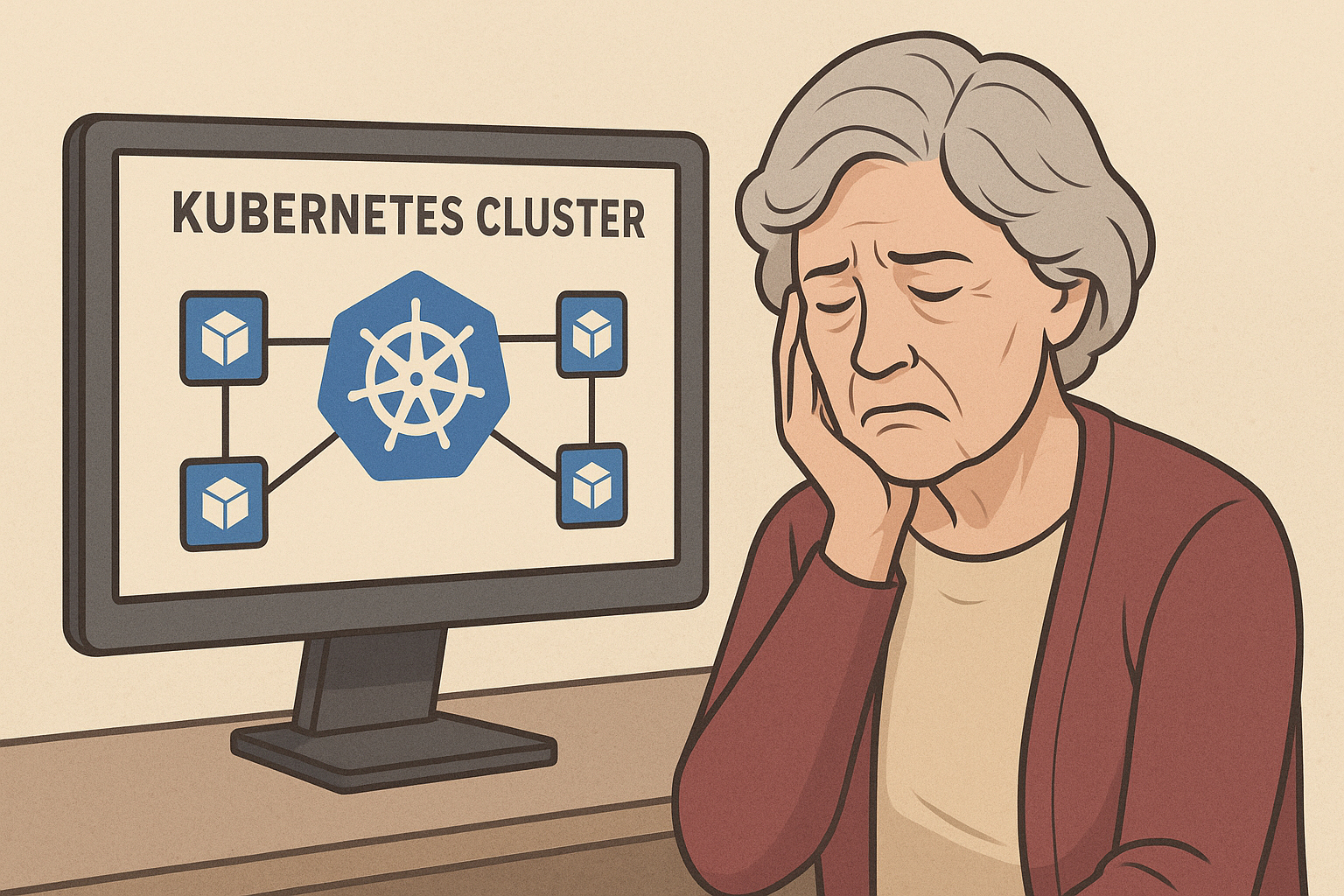
Last Sunday, my mom called. Not unusual. What was unusual was her opening question: "Julia, honey, what exactly do you DO at this computer job of yours?"

I should have said "software engineering" and changed the subject to her neighbor's cats. Instead, I made the fatal mistake of saying: "Well, right now I'm working on Kubernetes orchestration for our microservices architecture."

Pause.

"What's a Kubernetes?"

Three hours later, my mother had accidentally designed a container orchestration system. This is that story.

Chapter 1: The Great Container Confusion

"Think of it like Tupperware," I started, because that's what every good tech explanation begins with - food storage analogies.

"You have all these different applications - let's call them leftovers. Each leftover needs its own container so they don't contaminate each other. The containers need to be the right size, have good seals, and stack properly in the fridge."

Mom nodded. "Makes sense. So Kubernetes is like... my kitchen organization system?"

"Exactly! Except imagine you have 500 fridges, 10,000 different types of leftovers, and you need to automatically move containers around based on how much space is available and how often people want to eat specific things."

"That sounds incredibly complicated. Why not just have fewer fridges?"

I paused. She had a point.

"Well... because... microservices... and... scale..."

"Honey, when I have too many leftovers, I just give some to the neighbors. Problem solved."

Chapter 2: The Pod Paradigm

"Okay, but here's where it gets interesting," I continued, determined to make Kubernetes sound reasonable. "Sometimes you need multiple containers to work together. We call that a 'pod.'"

"Like when you store the pasta and sauce in separate containers but they go together?"

"YES! Exactly! A pod is like... a lunch box. The pasta container and sauce container travel together, get deployed together, and if one disappears, they both disappear."

Mom frowned. "But why would they disappear?"

"Well, sometimes the server crashes, or there's a memory leak, or—"

"Why don't you just fix the leaky container?"

I stared at my screen. "It's... it's not that simple, Mom."

"It is in my kitchen. If a container leaks, I either fix it or throw it away. I don't build a robot to automatically replace leaky containers with identical leaky containers."

Uncomfortable silence.

"Also," she continued, "why don't you just put the pasta and sauce in the same container? Like normal people?"

Chapter 3: The Service Discovery Debacle

"Okay, let me explain service discovery," I said, pivoting desperately. "Imagine you have all these containers in different fridges, and they need to find each other."

"Why are there different fridges?"

"Because... different zones... availability... look, just go with it. So you have a pasta container in Fridge A, and it needs to find the database container in Fridge B."

"Why isn't the database in the same fridge as the pasta?"

"BECAUSE OF SEPARATION OF CONCERNS, MOM."

"Don't yell at me, young lady. I'm trying to understand your job."

I took a breath. "Sorry. So... Kubernetes has this thing called a service mesh that helps containers find each other using DNS and load balancing."

"So it's like... a phone book?"

"Kind of, but imagine the phone book updates itself constantly, routes calls based on how busy people are, and sometimes randomly decides your call should go to someone in a different city for 'load balancing.'"

"That sounds like the worst phone book ever."

"You're not wrong."

Chapter 4: The Scaling Epiphany

"Here's the cool part," I said, grasping for redemption. "Kubernetes can automatically scale your applications based on demand. If more people want to use your pasta app, it creates more pasta containers automatically."

Mom perked up. "Like at Christmas! When I know more people are coming, I make more food."

"Exactly! But imagine you don't know how many people are coming, and they arrive randomly throughout the day, and you need to predict how much food to make based on CPU usage and memory consumption."

"That's ridiculous. I just ask people if they're coming."

"But... but what if there are millions of people?"

"Then I'd hire a caterer. I wouldn't build a robot kitchen that guesses how hungry people are based on their internet connection speed."

She paused thoughtfully. "Also, if I'm making pasta, and suddenly everyone wants salad instead, I don't make more pasta. I make salad. Your robot sounds stupid."

Chapter 5: The Configuration Catastrophe

"And here's the really sophisticated part," I continued, voice getting higher. "Everything is configured using YAML files. You can declare exactly how you want your infrastructure to behave."

"What's YAML?"

"It's like... a recipe format. But imagine the recipe is 400 lines long, and if you get the indentation wrong on line 237, your entire dinner explodes."

"That's the dumbest recipe format I've ever heard of."

"Also, you need different recipes for development, staging, and production, but they're 90% identical, so you use templating engines to generate the recipes from other recipes."

"So... you write recipes that write recipes?"

"Yes."

"To make pasta?"

"Well, to deploy the container that contains the application that serves the API that returns pasta data to the frontend that—"

"TO MAKE PASTA?"

"...yes."

Chapter 6: The Mom Solution™

"Okay," Mom said after a long pause. "Let me see if I understand this correctly."

She grabbed a notepad (yes, an actual paper notepad) and started drawing.

"You have pasta. People want pasta. You put pasta in complicated containers, distribute the containers across multiple kitchens, build robots to manage the containers, create phone books for the containers to find each other, write 400-line recipes to configure the robots, and then build more robots to monitor the first robots."

"That's... actually a pretty accurate summary."

"When you could just... make pasta and serve it to people?"

I stared at her diagram. She'd drawn a simple kitchen with a stove, a pot, and stick figures eating pasta. It was disturbingly elegant.

"But Mom, what about fault tolerance? What if the stove breaks?"

"I use the backup stove."

"What about scaling? What if 1000 people want pasta?"

"I make more pasta. Or I call Giuseppe down the street - he makes great pasta too."

"What about service discovery?"

"I put up a sign that says 'PASTA HERE.'"

"What about monitoring and observability?"

"I look at the pasta. If it's burning, I turn down the heat."

"What about... automated rollbacks?"

"If the pasta is bad, I throw it away and make new pasta. This isn't rocket science, honey."

Chapter 7: The Uncomfortable Truth

I sat there staring at her drawing for about five minutes. My mom had just described a distributed system that was simpler, more reliable, and easier to understand than anything I'd architected in the last three years.

"Mom... what if I told you that thousands of very smart engineers have spent decades building Kubernetes, and millions of companies use it?"

"I'd say they're overthinking it. Some of the smartest people I know can't figure out how to change a lightbulb because they're too busy calculating the optimal angle for maximum illumination efficiency."

She wasn't wrong.

"Also," she continued, "your Kubernetes sounds like it solves problems by creating bigger problems. That's not engineering - that's job security."

Ouch.

Chapter 8: The Light Cloud Moment

"But Mom," I said, "this is exactly why I started Light Cloud. We're building infrastructure blocks that work more like your kitchen than like Kubernetes."

"Oh! Like LEGO!"

"...yes, exactly like LEGO. You snap together the pieces you need - database block, API block, frontend block - and it just works."

"And people don't need to learn YAML?"

"No YAML. Just drag, drop, and deploy."

"And it doesn't create 500 configuration files?"

"No configuration files. The blocks handle that automatically."

"And if something breaks, you can actually see what's wrong?"

"Crystal clear monitoring. Like looking at pasta to see if it's burning."

Mom smiled. "Now THAT sounds like something useful."

Epilogue: The Kitchen Wisdom

Later that night, I couldn't stop thinking about our conversation. Here I was, building a company to fix the complexity crisis in cloud infrastructure, and my mom had explained the entire problem in kitchen terms.

Kubernetes isn't evil. It's incredibly powerful, and for certain use cases, it's absolutely necessary. But somewhere along the way, we decided that complex was better than simple, that configurable was better than functional, and that job security was more important than actually solving problems.

My mom's kitchen philosophy is simple: if you need 400 lines of instructions to make pasta, you're doing it wrong.

Maybe it's time we brought some of that kitchen wisdom to cloud infrastructure. Maybe it's time we built systems that work like my mom's kitchen - simple, reliable, and focused on actually feeding people instead of impressing other chefs.

At Light Cloud, we're building infrastructure blocks that my mom could understand. Because if the smartest person I know (who once fixed a washing machine with a paperclip and sheer determination) can't figure out your deployment system, maybe the problem isn't with the user.

Maybe the problem is with the system.


P.S. - Mom called today to tell me she's been thinking about Kubernetes, and she has some ideas about improving container orchestration using her spice rack organization system. I'm genuinely considering putting her on our technical advisory board. She also suggested we call our infrastructure blocks "Recipe Cards" instead of "Infrastructure Blocks" because "people understand recipes." She might be onto something.


This article first appeared on the Light Cloud Blog: https://blog.light-cloud.com/kubernetes/the-day-i-explained-kubernetes-to-my-mom.


Originally published at https://blog.light-cloud.com/dev-tools/integrated-cloud-environment on the Light Cloud Blog.

By Julia, Light Cloud

Summary: Your enterprise-grade infrastructure in minutes, not months.

Integrated Cloud Environment

What is ICE?

Integrated Cloud Environment is the world's first unified platform that brings together everything you need to build, deploy, and manage cloud infrastructure-all in one place.

Think of it this way: Just as Integrated Development Environments (IDEs) like Visual Studio revolutionized how developers write code by combining editors, compilers, and debuggers into one tool, ICE is revolutionizing cloud infrastructure by integrating architecture, deployment, monitoring, and security into a single visual platform.

The Problem ICE Solves

If you've ever built cloud infrastructure, you know the pain:

Disconnected Tools Everywhere You're juggling separate platforms for architecture diagrams, infrastructure deployment (Terraform, CloudFormation), monitoring (Datadog, CloudWatch), security scanning, and cost tracking. Each tool has its own learning curve, login, and interface.

Unpredictable Costs You deploy infrastructure and hope the pricing calculator was accurate. Weeks later, you're hit with an unexpected bill. Sound familiar?

Vendor Lock-In You built everything on AWS, but now you want to try Google Cloud or Azure. Good luck-you're essentially starting from scratch with new SDKs, authentication flows, and documentation.

Weeks of Setup Setting up a production-ready microservices platform with proper monitoring, security, and CI/CD? That's weeks or months of work, even for experienced DevOps teams.

How ICE Works

ICE integrates five critical components that are traditionally separated:

1. Architecture

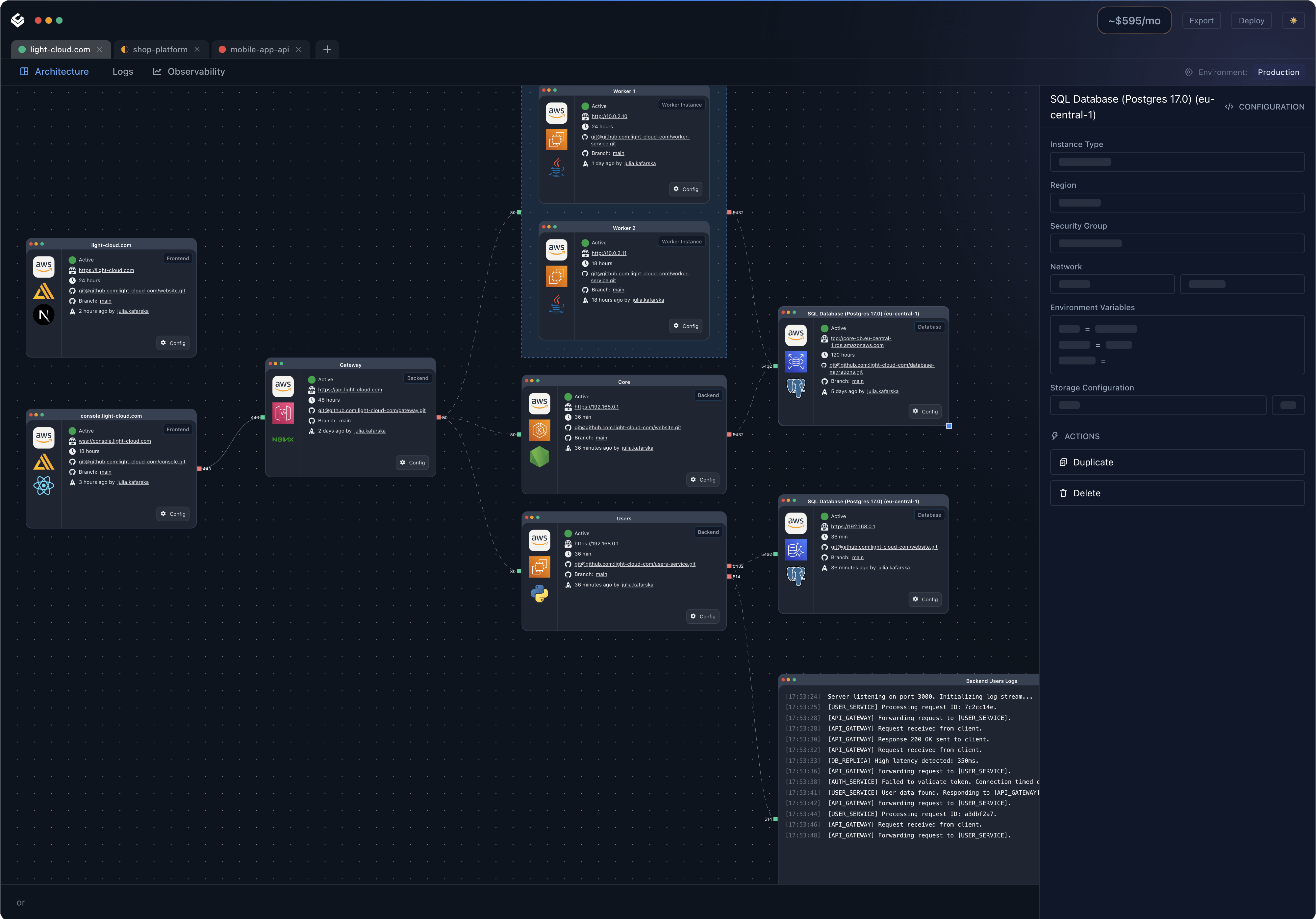
Design your infrastructure visually using a drag-and-drop interface with standardized blocks. No more switching between diagramming tools and actual deployment.

2. Infrastructure

Deploy your architecture directly to any major cloud provider (AWS, Google Cloud, Azure) with a single click. ICE handles all the provider-specific complexity behind the scenes.

3. Observability

Get full visibility across your distributed systems with integrated logs, metrics, and traces-all in one dashboard, regardless of which services you're using.

4. Security

Built-in security best practices and compliance checks ensure your infrastructure meets industry standards from day one.

5. Code

Load predesigned architecture templates with connected code repositories, or integrate your existing codebase seamlessly.

Key Features That Make ICE Different

Visual Studio for Cloud

Design your infrastructure visually using standardized blocks and templates. If you can drag and drop, you can build enterprise-grade infrastructure.

Live Cost Estimation

See real-time cost projections as you build. Change a server size or add a database? Watch the monthly estimate update instantly. No more surprise bills.

Multi-Cloud Freedom: True Provider Agnostic Architecture

One of ICE's most powerful features is its cloud-agnostic approach. Unlike traditional infrastructure-as-code tools that lock you into provider-specific syntax and services, ICE uses standardized blocks that work across all major cloud platforms.

What This Means For You:

Design Once, Deploy Anywhere Build your infrastructure using ICE's standardized blocks, then deploy to AWS, Google Cloud, or Azure without rewriting anything. The same architecture, the same configuration, different providers.

Seamless Cloud Migration Already running on one cloud provider? ICE makes migration straightforward:

  1. Import your existing infrastructure into ICE
  2. Review and adjust the standardized architecture
  3. Deploy to your target cloud provider

What traditionally takes months of rewriting infrastructure code, learning new provider-specific tools, and extensive testing can now be done in days.

Avoid Vendor Lock-In Your business requirements change. Maybe AWS pricing doesn't work for your scale, or you need Google Cloud's specific AI services, or Azure's enterprise integrations. With ICE, switching providers isn't a multi-month project-it's a configuration change.

Multi-Cloud By Default Run parts of your infrastructure on different providers simultaneously. Use AWS for your main application, Google Cloud for data processing, and Azure for enterprise integrations-all managed from one interface with unified observability.

Provider-Specific Complexity, Abstracted Each cloud provider has its own:

  • SDKs and APIs
  • Authentication mechanisms
  • Service names and configurations
  • Networking models
  • Security paradigms
  • Documentation quirks

ICE handles all of this complexity for you. You work with standardized blocks, and ICE translates to provider-specific implementations automatically.

Full System Visibility

Monitor everything from a single dashboard. Logs, metrics, traffic patterns, performance data-all unified and correlated, so you can actually understand what's happening across your entire system.

Templates That Cover 80% of Use Cases

Start with proven, production-ready templates for common scenarios:

  • Microservices SaaS platforms
  • E-commerce systems
  • Data processing pipelines
  • API backends
  • Mobile app backends

Customize as needed, or use them as-is.

Who ICE Is For

For Developers

Stop context-switching between tools. Build, deploy, and monitor from one interface. Spend more time coding, less time on infrastructure headaches.

For DevOps Teams

Reduce the operational burden. ICE automates the complex setup and integration work, so you can focus on optimization and scaling instead of basic infrastructure management.

For Startups

Launch faster. Get enterprise-quality infrastructure without needing a full DevOps team or months of setup time. Your MVP can have production-grade infrastructure from day one.

For Non-Technical Founders

You don't need to be a cloud expert. ICE handles the technical complexity so you can focus on building your business. Launch your startup infrastructure in minutes, not months.

From Months to Minutes: A Real Comparison

Traditional Approach (Weeks to Months)

  1. Research cloud providers and services (days)
  2. Learn infrastructure-as-code tools (weeks)
  3. Design architecture (days to weeks)
  4. Write deployment scripts (weeks)
  5. Set up monitoring and logging (weeks)
  6. Configure security and compliance (days to weeks)
  7. Test and debug everything (weeks)
  8. Write documentation (days)

Total: 2-4 months for experienced teams

With ICE (Minutes)

  1. Choose a template or drag blocks to design
  2. Configure settings
  3. Deploy

Total: 5-15 minutes

The Technology Behind ICE

ICE is built on a foundation of:

  • Standardized, cloud-agnostic infrastructure blocks
  • Real-time cost calculation engines
  • Integrated observability pipelines
  • Multi-cloud deployment orchestration
  • Visual architecture design tools

All designed to work together seamlessly, so you don't have to make them work together yourself.

Related reading


This article first appeared on the Light Cloud Blog: https://blog.light-cloud.com/dev-tools/integrated-cloud-environment.


Originally published at https://blog.light-cloud.com/multi-cloud/aws-goes-dark-october-20-2025 on the Light Cloud Blog.

By Julia, Light Cloud

Summary: AWS had another 'minor hiccup' that only lasted 15 hours and affected over 1,000 companies. Here's why putting all your eggs in one cloud basket is like trusting a single parachute made of spaghetti.

AWS Goes Dark: How October 20's Outage Proved Multi-Cloud Isn't Just Paranoia

AWS just gave us another reminder that vendor lock-in is about as smart as using "password123" for your production database.

On October 20, 2025, at 11:48 PM PDT (because outages always happen when engineers are either sleeping or three beers into their weekend), AWS's US-EAST-1 region decided to take an unscheduled 15-hour vacation. And when US-EAST-1 sneezes, the entire internet catches pneumonia, gets quarantined, and starts panic-buying toilet paper.

This wasn't just any outage. This was AWS's longest service disruption in a decade. Think about that. A DECADE. These are the people who promise 99.99% uptime, and they just blew through an entire year's worth of their error budget in one spectacularly bad Monday.

A Race Condition Walks Into a Bar...

Here's what happened: AWS's DynamoDB service had a "race condition" in its DNS management system. For the non-technical folks, imagine two robots trying to update the same phone book at the exact same time, but one robot is drunk and the other one is running Windows Vista.

Specifically, one DNS Enactor was taking its sweet time applying old DNS records (probably stopped for coffee), while another DNS Enactor applied new records and started cleaning up. The slow one then overwrote everything, and the cleanup process immediately deleted those records.

The result? All IP addresses for DynamoDB's main DNS records just... disappeared. Poof. Gone. Like your motivation on a Monday morning, except this actually mattered.

At 12:26 AM PDT, AWS sheepishly admitted: "We determined that the event was the result of DNS resolution issues for the regional DynamoDB service endpoints."

Translation: "Our internet phone book ate itself and we're very sorry your billion-dollar company can't access anything right now."

The Domino Effect From Hell

The cascade was beautiful in its destruction:

  • DynamoDB stops responding (11:48 PM PDT)
  • Every service depending on DynamoDB panics
  • EC2 instances start failing
  • 113 AWS services experience "difficulties" (corporate speak for "completely hosed")
  • Amazon.com itself goes wobbly (Amazon broke Amazon)
  • United Airlines and Delta can't check passengers in (hello, manual check-in lines at ATL and ORD)
  • Robinhood locks everyone out during market hours (sorry, no panic selling today)
  • Coinbase goes dark (your crypto is "safe" but also completely inaccessible, which is basically Schrödinger's Bitcoin)
  • Roblox's 70 million daily users get kicked offline (finally, parents get some peace)
  • Fortnite players ejected mid-battle (230 million gamers crying in unison)
  • Ring doorbells go blind (all those packages, just sitting there, vulnerable)
  • Alexa becomes a very expensive brick
  • Disney+, Netflix, Hulu, and Prime Video all buffer eternally
  • Snapchat's 400 million users lose their streaks (the horror)
  • Signal goes offline (so much for "secure" communications)
  • Even the UK's tax website crashed (tax evasion was briefly consequence-free)

Meanwhile, somewhere in Seattle, AWS engineers were getting the kind of phone calls that start with "DROP EVERYTHING" and end with "JEFF WANTS UPDATES EVERY 5 MINUTES."

Engineers: The Five Stages of Cloud Grief

Stage 1: Denial (11:48 PM - 12:30 AM)

"It's probably just a monitoring glitch. Have you tried turning CloudWatch off and on again?"

"The dashboard must be wrong. DynamoDB doesn't just... stop."

"Maybe it's just affecting that one region... oh wait, it's US-EAST-1. We're doomed."

Stage 2: Anger (12:30 AM - 2:00 AM)

The Slack channels explode:

@channel WHO DEPLOYED TO PROD ON A SATURDAY NIGHT?!
@channel DNS is down AGAIN. AGAIN!!!
@channel I TOLD YOU WE NEEDED MULTI-REGION
@channel We have 6.5 MILLION error reports on Downdetector
@channel Coffee machine is also down. THIS IS NOW PERSONAL.

Stage 3: Bargaining (2:00 AM - 8:00 AM)

"What if we just... route everything through US-WEST-2?"

"Has anyone tried calling Jeff Bezos directly?"

"I'll name my firstborn DynamoDB if it just starts working again."

Someone definitely suggested have we tried sacrificing a goat to the cloud gods? like that crazy lady from light-cloud. Multiple someones, probably.

Stage 4: Depression (8:00 AM - 3:00 PM)

Picture this: hundreds of engineers, fueled by Red Bull and existential dread, silently typing while their managers hover behind them like anxious helicopters. The pizza boxes stack up. Hope dwindles. Someone starts calculating the cost per minute and immediately regrets their career choices.

Financial analysts are estimating losses in the hundreds of billions of dollars. Not millions. BILLIONS. With a B. That's "buy a small country" money, except instead you're paying for the privilege of watching error messages.

Stage 5: Acceptance (3:01 PM)

"Fine. We'll implement the ugly workaround."

"Add 'implement multi-cloud strategy' to the Q1 roadmap. No, make it Q4. We're tired."

"At least we're not the only ones down?"

After 15.2 hours of chaos, AWS finally declared victory at 3:01 PM PDT. The post-incident report emphasized "rapid response," which is corporate speak for "our engineers haven't slept in 36 hours and are now communicating exclusively in memes and profanity."

The Hidden Costs (AKA: The Bill You Don't Want to See)

While AWS was down, thousands of companies discovered the true cost of single-cloud dependency:

  • Lost revenue: Every minute of downtime = thousands in lost sales. For 15 hours. Do the math. Then cry.
  • Engineer overtime: Nothing says "budget overrun" like emergency all-hands debugging sessions that last through sunrise
  • Customer trust: "Sorry, AWS is down" doesn't sound professional when you're trying to check into your flight and the gate agent is waving a printed boarding pass at you like it's 1995
  • Stress-induced coffee consumption: Seattle's coffee shops made a fortune. Starbucks mobile ordering was down, but in-person sales probably hit record highs
  • Trading losses: Robinhood and Coinbase users couldn't trade during market hours. That's not just annoying-that's potentially lawsuit territory

Venmo had 8,000+ outage reports. People couldn't split their brunch bills. Do you know how many friendships ended that day because someone couldn't immediately settle their $12 avocado toast debt?

The Reality Check Nobody Wanted

Here's the uncomfortable truth AWS doesn't want you thinking about: Multi-cloud isn't paranoia, it's insurance.

AWS controls 30-37% of the global cloud market. That's roughly a THIRD of all cloud infrastructure. When they sneeze, a third of the internet needs a tissue.

As Rob Jardin, Chief Digital Officer at NymVPN, noted: "The internet was originally designed to be decentralized and resilient, yet today so much of our online ecosystem is concentrated in a small number of cloud regions."

Translation: We built the internet to survive nuclear war, but can't survive AWS having a bad day.

But here's the problem: making your infrastructure multi-cloud ready is like learning to juggle while riding a unicycle through a minefield:

The Traditional Multi-Cloud Nightmare:

  • AWS: Uses CloudFormation templates, speaks AWS-ish
  • Google Cloud: Requires Deployment Manager, speaks Google-ese
  • Azure: Demands ARM templates, speaks Microsoft-ian
  • Your sanity: 404 Not Found

Each provider has its own:

  • Authentication methods (because standards are for losers)
  • SDK quirks (same function, 47 different names, because consistency is boring)
  • Pricing models (comparing them requires a PhD in Advanced Mathematics and a minor in Interpretive Dance)
  • Documentation style (ranging from "overly verbose" to "did an AI having a stroke write this?")

The financial impact? Hundreds of billions in losses, according to Mehdi Daoudi, CEO of Catchpoint. That includes lost productivity for millions of workers, stopped airline operations, missed trading opportunities, inability to access funds, lost gaming revenue, and advertising losses.

For perspective: The July 2024 CrowdStrike incident cost Fortune 500 companies $5.4 billion in direct losses. This AWS outage lasted longer and affected more services. You do the math-it's depressing.

How ICE Would've Saved Your Monday (And Your Job)

Before the Outage:

  1. Deploy your infrastructure using our visual studio (no YAML gymnastics required, no crying at 3 AM over indentation errors)
  2. ICE automatically maintains templates for AWS, GCP, and Azure (we speak all three dialects of cloud gibberish)
  3. Our AI-powered cost predictor shows you pricing across all providers (so you can see exactly how much you're overpaying)
  4. One-click to replicate your setup across multiple clouds (seriously, one click, we're not exaggerating)

During the Outage:

  1. AWS goes down? Click the "Oh Shit, Migrate!" button (yes, we actually call it that internally)
  2. ICE translates your AWS infrastructure to GCP or Azure format (like Google Translate, but actually useful)
  3. Deploys your backup infrastructure in minutes, not hours (your competitors are still on hold with AWS support)
  4. Traffic routing switches automatically (because manual DNS updates at 3 AM are how mistakes happen)
  5. You go back to sleep while your competitors panic-tweet at @AWSSupport

After the Outage:

  • Keep both deployments for redundancy (because you just learned this lesson the hard way)
  • Or migrate back with one click (no hard feelings, AWS)
  • Either way, you're never held hostage by a single provider again

The "We're Sorry" (But Not Really) Response

AWS's apology was peak corporate-speak: "We apologize for the impact this outage has had on our customers. We have a strong track record of operating our services with high levels of availability."

"Strong track record"? This was your third major US-EAST-1 outage in five years and your longest disruption in a decade. That's not a track record, that's a pattern.

Their fix? They disabled the DynamoDB DNS automation worldwide. You know, the thing that caused the problem. Just... turned it off. Everywhere.

It's like your smoke detector kept going off randomly, so you solved the problem by removing all the batteries. Technically effective, but maybe concerning?

AWS also promised to "add mechanisms to limit the number of servers Network Load Balancer will disconnect when health checks fail" and "strengthen recovery tests."

Translation: "We're going to add more duct tape and actually test our disaster recovery plans instead of just assuming they work."

The Standardization Revolution (Or: Why We Keep Building the Same Wheel)

Here's the thing that makes me irrationally angry: 80% of cloud infrastructure follows the same patterns.

  • Web server + Database + Cache
  • Microservices + Message Queue + Storage
  • API Gateway + Lambda + DynamoDB

Yet every cloud provider acts like they invented these concepts from scratch. It's like car manufacturers making you learn a completely different way to drive for each brand.

"Oh, you want to turn left in a Honda? That's the red pedal. In a Toyota? Purple lever. In a Ford? You have to sing the ABCs backwards."

ICE standardizes these patterns into reusable blocks:

  • Deploy once, run anywhere (yes, like Docker promised, but for entire infrastructures)
  • Provider-agnostic templates (your "web app" block works on any cloud)
  • Automatic translation (CloudFormation -> Terraform -> ARM, seamlessly, like magic but with more Python)

Lessons from the Trenches (Written in Blood and Error Logs)

After analyzing this outage and hundreds before it, here's what we've learned:

1. Multi-Cloud is No Longer Optional

If you're running anything mission-critical on a single cloud, you're one DNS race condition away from explaining to your CEO why the company lost millions on a Monday.

2. US-EAST-1 is Cursed

This region has failed three times in five years. At what point do we admit that us-east-1 is built on an ancient burial ground?

3. Migration Preparedness is Key

Can you move your infrastructure in under an hour? If not, you're one outage away from disaster and a resume-generating event.

4. Standardization Beats Optimization

That perfectly optimized, AWS-specific architecture? Worthless when AWS is down. Better to be 90% optimized and 100% portable than 100% optimized and 0% functional.

5. AWS's Apology Doesn't Pay Your Bills

They'll give you service credits. You know what doesn't accept service credits? Your investors. Your customers. Your mortgage company.

The Bottom Line

AWS's October 20 outage wasn't unique. It won't be the last. Every cloud provider has these moments-it's not about if but when.

The question is: Will you be the company that tweets "We're experiencing issues due to AWS" or the one that tweets "Business as usual, thanks to our multi-cloud architecture" while your competitors burn?

Because let me tell you, when United Airlines passengers are standing in line for manual check-in and Robinhood users can't panic-sell during market hours, nobody cares about your 99.99% uptime SLA. They care about whether your service works RIGHT NOW.

With Light Cloud's ICE, you can:

  • Provision infrastructure on any cloud in minutes (faster than your morning coffee)
  • Migrate between providers with one click (no, seriously, ONE CLICK)
  • Visualize your entire architecture (instead of praying your YAML is correct)
  • Predict costs before deployment (no more $50,000 surprise bills)
  • Standardize your infrastructure (use the same blocks everywhere, like Lego but for clouds)

Because in 2025, vendor lock-in isn't just expensive-it's irresponsible. It's the technical equivalent of keeping all your money under your mattress and hoping your house doesn't burn down.

Spoiler alert: The house is currently on fire.


P.S. - To the AWS engineers who pulled a 15-hour shift on October 20: we salute you. May your coffee be strong, your DNS be fast, and your race conditions be forever caught in code review. Also, maybe test that automation before deploying it worldwide next time?

P.P.S. - This outage cost hundreds of billions of dollars. For that price, we could have built a entirely new internet. From scratch. With blackjack. And working DNS.

Related reading


This article first appeared on the Light Cloud Blog: https://blog.light-cloud.com/multi-cloud/aws-goes-dark-october-20-2025.


Originally published at https://blog.light-cloud.com/startup/light-cloud-joins-google-for-startps-program on the Light Cloud Blog.

By Julia, Light Cloud

Summary: We got accepted into Google Cloud for Startups. Yes, we're building a tool to help you escape vendor lock-in, and yes, Google is giving us credits. The irony isn't lost on us.

Light Cloud Joins Google Cloud for Startups Program

We have news: Light Cloud has been accepted into the Google Cloud for Startups program.

I know what you're thinking. "Wait, aren't you building a tool that helps people avoid vendor lock-in? And now you're getting backed by... a vendor?"

Yes. And honestly? That's exactly the point.

Maybe Google's old "Don't be evil" motto still means something. Supporting a startup that's building tools to give developers more freedom and choice? That's not evil. That's actually pretty cool.

Why This Matters

Here's the thing about building cloud-agnostic infrastructure: you still need to run it somewhere. We're a bootstrapped pre-seed startup, and cloud credits are cloud credits. Google isn't paying us to lock anyone in—they're betting that developers who have choice will still choose good products.

That's the future we're building toward. One where you pick your cloud provider because it's the best fit, not because migrating away would require sacrificing your firstborn to the Kubernetes gods.

What We Get

The program gives us credits to run our own infrastructure, access to Google Cloud's technical resources, and connections to their startup ecosystem. For a two-person team (plus one incredible advisor) building an entirely new category of software, this kind of support goes a long way.

What We're Building

If you're new here: Light Cloud is creating the Integrated Cloud Environment (ICE)—think Visual Studio, but for cloud infrastructure. We're bringing architecture, infrastructure, observability, security, and code into one visual platform.

No more juggling Terraform, CloudWatch, cost calculators, and architecture diagrams in 47 browser tabs. No more surprise bills. No more being stuck with one provider because migration would take six months and three engineers you don't have.

What's Next

We're deep in MVP development and actively raising our pre-seed round. This grant means more runway to build, more time to get ICE into the hands of developers who are as frustrated with cloud complexity as I was when I started this company.

If that's you—if you've ever spent 14 hours debugging Kubernetes networking or gotten a cloud bill that made you question your life choices—we're building Light Cloud for you.


Want early access? Drop us a line at julia@light-cloud.com

Following our journey? light-cloud.com

Related reading


This article first appeared on the Light Cloud Blog: https://blog.light-cloud.com/startup/light-cloud-joins-google-for-startps-program.


Originally published at https://blog.light-cloud.com/startup/light-cloud-roadmap on the Light Cloud Blog.

By Julia, Light Cloud

Summary: People keep asking about our roadmap. Investors want timelines. Beta users want features. My therapist wants to know why I twitch every time someone says 'scope creep.' So here it is-five steps from scrappy MVP to enterprise cloud domination, complete with the delusion, optimism, and questionable life choices that got us here.

Cloud CPR: A 5-Step Resuscitation Program

The Light Cloud Roadmap: A 5-Step Program for Cloud Recovery

"This Will Take Two Weeks," She Said, Weeping

People keep asking me about the Light Cloud roadmap. Investors want timelines. Beta users want features. My therapist wants to know why I twitch every time someone says "scope creep."

So here it is. The official Light Cloud roadmap. Five steps from "scrappy MVP" to "enterprise cloud domination." Complete with the delusion, optimism, and questionable life choices that got us here.

Buckle up. This is going to be honest.

Step 1: The MVP

Status: Live and slightly feral

Let's start with what exists right now. The MVP. The Minimum Viable Product. The "please dear god let this work in the demo" version.

Here's what we built: imagine if Render and Vercel had a very productive weekend together, and nine months later they produced a child that actually understood databases.

That's ICE MVP.

What it does:

  • Push code -> it deploys. That's it. That's the tweet.
  • Connect a database without writing 47 lines of YAML
  • CI/CD that doesn't require a PhD in GitHub Actions
  • Works with Node.js, Python, and PHP (more coming, I promise)

The philosophy: Deployment should feel like ordering coffee, not filing taxes.

You know what took the longest to build? The "it just works" part. Making something simple is stupidly hard. We spent three weeks on a feature that users will never notice because the whole point is that they DON'T notice it. They just push code and it deploys.

I told my advisor Cristina this would take "maybe two weeks." She laughed. She's worked with me before.

It took two months.

But here's the thing-every startup needs this foundation. Not the Kubernetes-flavored nightmare that AWS wants to sell you. Not the "just spin up an EKS cluster" that costs $73/month before you deploy a single container. Just... deployment. Simple, fast, predictable deployment.

Timeline estimate: Done (only 6 weeks behind schedule, which in startup time is basically early)


Step 2: ICE Light + The Visual Editor

Status: In development, consuming my weekends

This is where things get interesting. And by "interesting," I mean "the reason I haven't seen sunlight in three weeks."

ICE Light introduces the visual editor. Drag-and-drop infrastructure. The thing that should have existed ten years ago but didn't because cloud providers make more money when you're confused.

Picture this: You want a web app with an API, a database, and a Redis cache. Current approach? Open 14 browser tabs. Read 6 tutorials. Write YAML that looks like abstract poetry. Pray.

ICE Light approach: Drag "Web App" block. Drag "API" block. Drag "Database" block. Draw lines between them. Click deploy. Go touch grass.

Features coming:

  • Visual infrastructure canvas (like Figma, but for servers)
  • Real-time cost estimation as you build (drag a database, watch the price update)
  • One-click connections between services
  • Cloud Blocks - standardized, reusable infrastructure components (database block, auth block, queue block, cache block). Drag them in. They work. No configuration hell.
  • Cloud Templates - full architecture patterns ready to deploy. Need a SaaS starter? E-commerce platform? API with auth and payments? One click. Done.
  • Code Boilerplates - because infrastructure without code is just expensive empty servers. Each template comes with starter code. Node.js, Python, PHP. Clone, customize, ship.

The hard part nobody talks about: Making a visual editor that isn't just a toy. Every "visual infrastructure tool" I've tried feels like it was designed for a marketing demo, not actual work. Click three buttons and-wow!-you've deployed a "Hello World" app. Try to do anything real and suddenly you're back in the terminal.

We're building for developers who've been burned before. Developers who see "drag and drop" and immediately think "yeah, until I need to do something slightly unusual."

ICE Light will handle the unusual. Or I'll die trying. (My advisor says I shouldn't put that in writing. I'm keeping it.)

Optimistic timeline: Q2 2026 Realistic timeline: Q2 2026 + "a few extra weeks" Timeline I'm telling investors: Q2 2026


Step 3: ICE Light + More Cloud Providers (Or: The Polyamory Phase)

Status: Blueprints exist, implementation pending

Right now, ICE works with the Big Three: AWS, Google Cloud, Azure. But the whole point of ICE is that you shouldn't be locked into any of them.

Step 3 is about expansion. More providers. More options. More freedom.

Adding to the roster:

  • DigitalOcean (for the indie hackers who don't need enterprise pricing for a blog)
  • Linode/Akamai (solid, underrated, reasonably priced)
  • Hetzner (European hosting that doesn't cost a kidney)
  • Oracle Cloud (yes, really-their free tier is actually good, fight me)
  • Alibaba Cloud (if you're doing business in China, you need this-no way around it)
  • Tencent Cloud (800 million WeChat users aren't wrong)
  • Huawei Cloud (growing fast, competitive pricing, strong in Asia and Europe)

Cloud Blocks & Templates go cross-provider:

This is where our standardized approach pays off. Every Cloud Block and Cloud Template from Step 2? They now work across every provider we support.

Built a SaaS starter on AWS? Deploy the same template to DigitalOcean. Literally the same template. We handle the translation.

Expanding the template library:

  • SaaS Starter Kit - Auth, payments, user management, API, database. The stuff every SaaS needs. Stop rebuilding it.
  • E-commerce Platform - Product catalog, cart, checkout, inventory. Shopify-like infrastructure without Shopify prices.
  • API Backend - REST or GraphQL, authentication, rate limiting, logging. Production-ready from day one.
  • Content Platform - CMS, media storage, CDN, caching. For blogs, portfolios, documentation sites.
  • Real-time App - WebSockets, pub/sub, presence detection. Chat apps, dashboards, collaborative tools.

Each template ships with code boilerplates on GitHub. Clone the repo. Connect to ICE. Deploy. Your startup has infrastructure before your coffee gets cold.

Why this matters: Different projects need different providers. Your side project doesn't need AWS. Your European SaaS with GDPR requirements might need Hetzner. Your client who's irrationally loyal to Microsoft needs Azure.

ICE should work with all of them. Same interface. Same experience. Different backends.

The technical challenge: Every cloud provider invented their own special language for doing the exact same things. AWS calls it "Security Groups." Google calls it "Firewall Rules." Azure calls it "Network Security Groups." They're all firewalls. They all do the same thing. They all have completely different APIs.

Our job is to build the universal translator. Standardized blocks that compile down to provider-specific infrastructure. Write once, deploy anywhere.

(If that sounds simple, I invite you to read the AWS VPC documentation and the Google Cloud VPC documentation back-to-back. Then call your therapist.)

Timeline: Q3-Q4 2026


Step 4: Full Multi-Cloud ICE Light

Status: The dream I whisper to myself at night

This is the big one. The feature that makes CTOs weep with joy. The end of vendor lock-in.

Full multi-cloud means:

  • Deploy the same application across multiple providers simultaneously
  • Failover between clouds automatically
  • Move your entire infrastructure from AWS to Google Cloud with one click
  • Run different services on different providers (database on AWS, compute on Google, CDN on Cloudflare)

New templates for serious infrastructure:

  • Video Streaming Platform - Encoding pipeline, CDN distribution, adaptive bitrate streaming, storage. Build your own Netflix. Okay, maybe your own Vimeo. The point is: video infrastructure is notoriously painful, and we're packaging it into something a solo developer can deploy.

  • Private AI Platform - This is the big one. Deploy your own LLM infrastructure. On your hardware. In your cloud. Your data never leaves your environment. Fine-tuning pipelines, inference endpoints, model versioning, GPU orchestration. For companies that want AI capabilities without sending sensitive data to OpenAI or Anthropic. (No offense, Claude. You're great. But some industries can't use you for compliance reasons.)

Why multi-cloud matters for these templates: Video streaming needs edge nodes everywhere. AI inference needs GPUs wherever they're cheapest (spoiler: it's not always AWS). Multi-cloud lets you optimize for performance AND cost simultaneously.

Real scenario this solves: Your startup is on AWS. AWS has an outage. (They had a major one in October 2025-I wrote about it.) Your entire product goes down. Your customers are angry. Your competitors are tweeting "maybe try [their product]."

With full multi-cloud ICE Light, you click a button and your traffic shifts to Google Cloud. Outage? What outage? Your users don't even notice.

Another scenario: AWS jacks up their prices. Again. You get the email. You sigh. You open a spreadsheet to calculate the damage.

With ICE Light, you click "migrate to cheaper provider," go get coffee, and come back to a deployment that costs 40% less. Same infrastructure. Different bill.

The engineering reality: This is genuinely hard. Not "startup hard" where you just need more engineers. Academically hard. State synchronization across providers. Data consistency during migration. DNS propagation. SSL certificate management across multiple endpoints.

We're building it anyway. Because someone has to.

Timeline: 2027 (I'm not lying to you about this one)


Step 5: ICE Pro - The Enterprise Beast Awakens

Status: Napkin sketches and big dreams

ICE Light is for startups, indie hackers, and developers who want things to just work.

ICE Pro is for companies that need to know exactly what's happening across their entire cloud infrastructure. Real-time. In depth. With alerts that actually mean something.

ICE Pro features (planned):

  • Deep infrastructure monitoring (not just "is it up," but "why is it slow")
  • Cost anomaly detection with AI (spot the runaway Lambda before it costs you $4,000)
  • Security posture management (find misconfigurations before hackers do)
  • Compliance dashboards (SOC 2, HIPAA, GDPR-one view)
  • Team management and access controls
  • Audit logs for everything
  • Custom alerting rules that don't spam you at 3 AM for nothing

Who this is for: Growing startups hitting scale. SMBs with actual infrastructure. Companies that got burned by surprise bills (hi, it me) and never want it to happen again.

The philosophy shift: ICE Light says "don't worry about infrastructure, we handle it." ICE Pro says "here's exactly what your infrastructure is doing, in terms a human can understand."

Both are valid. Different stages need different tools.

Timeline: 2027-2028 (enterprise features take enterprise time)


The Honest Timeline Disclaimer

Look, I've been in this industry for over a decade. I've seen roadmaps. I've written roadmaps. I've watched roadmaps catch fire and burn to the ground while everyone pretends everything is fine.

Here's what I know:

  • Step 1 is done
  • Step 2 is happening right now
  • Steps 3-5 will happen in that order
  • The exact dates will shift because software development is not a factory assembly line

What won't shift: our commitment to building something that actually works. That respects developers' time. That doesn't hide costs in 73-page invoices.

If you want a roadmap with exact dates and contractual guarantees, go buy from Oracle. (Actually, don't. Have you seen their contracts?)

If you want to watch a small team build something genuinely useful in real-time, with all the chaos and pivots and "we changed this because users told us it sucked"-stick with us.


Why I'm Telling You All This

Most startups hide their roadmaps. Competitive advantage. Trade secrets. Fear that someone will build it faster.

I'm showing you ours because:

  1. Accountability. Now I have to actually build this stuff. You're all witnesses.

  2. Feedback. If you look at this roadmap and think "you're missing X"-tell me. Seriously. Our beta users have already shaped half of what we're building.

  3. Trust. The cloud industry runs on opacity. Hidden pricing. Vague "enterprise features." Roadmaps that say "coming soon" for three years. We're trying something different.


Want to Be Part of This?

We're actively building, actively fundraising, and actively looking for beta users who want to shape what cloud infrastructure becomes.

For developers: Join the beta. Break things. Tell us what sucks. Get free access while we're in this phase.

For investors: We're raising pre-seed. If you've ever been personally victimized by a cloud bill, we should talk.

For the curious: Follow along. Sign up for the waitlist. Watch us either succeed spectacularly or fail publicly.

Either way, it'll be entertaining :D

Related reading


This article first appeared on the Light Cloud Blog: https://blog.light-cloud.com/startup/light-cloud-roadmap.


Originally published at https://blog.light-cloud.com/dev-tools/introducing-light-cloud on the Light Cloud Blog.

By Julia, Light Cloud

Summary: Light Cloud is a deployment platform that brings the simplicity of Vercel to full-stack applications. Deploy React apps, containerized backends, and PostgreSQL databases with a single click. No DevOps required.

Deploy Full-Stack Apps in Minutes

What if deploying your entire stack was as simple as pushing to GitHub?

That's the question we asked ourselves when building Light Cloud. We were tired of the same story: you build an amazing app, and then you spend days configuring infrastructure. Setting up CI/CD. Wrestling with Docker. Figuring out how to connect your frontend to your backend to your database.

Today, we're launching Light Cloud, a deployment platform that handles all of it.

A True Full-Stack Platform

Light Cloud isn't just another static site host. It's a complete deployment platform for modern applications. Frontend, backend, database, all in one place.

Applications dashboard showing Node.js backends, static sites, and multiple environments

Deploy Node.js, Python, Go, Java backends alongside React, Vue, Angular, Svelte frontends. Connect your GitHub and go.

Every Framework, Every Runtime

Static Sites: React, Next.js, Vue, Angular, Svelte, plain HTML. We auto-detect your framework and build settings from your repository. Global CDN distribution included.

Container Applications: Node.js, Python, Go, Java, Ruby, PHP, .NET. Light Cloud generates Dockerfiles automatically for common runtimes, or bring your own. Configure CPU and memory to match your workload.

Managed Databases: PostgreSQL databases with automated provisioning, backups, and connection management. Spin one up in seconds, not hours.

GitHub-Native Workflow

We built Light Cloud around how developers actually work:

  • Auto-deploy on push: Every push to your tracked branch triggers a new deployment
  • Branch environments: Push a new branch, get a new environment. Perfect for feature testing and PR previews
  • Auto-cleanup: Delete a branch? We clean up the environment automatically (production is always protected)

Deployment history with GitHub auto-deploy

Every commit deploys automatically. Full deployment history with commit links and status tracking.

Your deployment URL follows a predictable pattern: {branch}-{app}-{org}.light-cloud.io

Your main branch deploys to main-myapp-acme.light-cloud.io, and your feature-auth branch gets feature-auth-myapp-acme.light-cloud.io. No configuration needed.

Real-Time Logs

Debug issues without SSH access. Stream logs from your containers in real-time, filter by severity, search across your entire log history.

Live logs with severity filtering and search

Searchable logs with timestamps, severity levels, and filtering. See exactly what your app is doing.

No more guessing why something failed. No more waiting for log aggregation. Just instant visibility into your running applications.

Built-In Metrics Dashboard

Monitor your applications without setting up Prometheus, Grafana, or any other observability stack. Light Cloud tracks the metrics that matter:

  • CPU and memory usage
  • Request count and latency
  • Active instances
  • Bandwidth in/out

Metrics dashboard showing CPU, memory, requests, and instances

Real-time metrics for every environment. Track performance, spot issues, understand your resource usage.

See exactly how your app performs, when it scales, and what resources it consumes. All built in.

Scale-to-Zero by Default

Here's what makes Light Cloud different from traditional cloud providers: you only pay when your app is running.

Most platforms charge you 24/7 whether anyone is using your app or not. Light Cloud containers scale to zero when idle. That side project you're working on? It costs practically nothing until it gets traffic.

When a request comes in, we spin up your container in seconds. When traffic stops, we scale back down. Your bill reflects actual usage, not theoretical capacity.

Pricing That Makes Sense

We believe in transparent pricing you can work out on a napkin. (Update, September 2026: Light Cloud now sells plans that include usage - from a free Hobby plan with $5 of usage a month to Business at $149 - metered at the same per-hour rates on every plan. The rates below are from launch; the current ones are on the pricing page.)

Resource Price Real example
Container (Nano/Micro) $0.03/hour 1 hour test = three cents
Container (Small) $0.03/hour 100 hours = $3
Database (Dev, shared) pennies/hour a few dollars/month
Static Site $0.02/month Six sites = twelve cents
Team Members $9/user/month

Free to start: the Hobby plan is free for as long as you like and includes $5 of usage a month. No credit card. You see exactly what everything uses, so there are no surprises when you move to a paid plan.

Scale-to-zero means your containers cost literally $0 when not running. Test environment for an hour? Three cents. Vacation month? Zero.

Built for Developers Who Ship

Light Cloud is for:

  • Indie hackers launching their next SaaS
  • Startups that need production infrastructure without a DevOps hire
  • Developers building side projects on weekends
  • Teams wanting Vercel simplicity with container and database support

If you've ever wished you could just git push and have everything work, that's exactly what we built.

Get Started in Minutes

  1. Sign up at console.light-cloud.com
  2. Connect your GitHub account
  3. Select a repository
  4. Click deploy

That's it. No Dockerfiles to write (unless you want to). No CI/CD pipelines to configure. No infrastructure to manage.

Your first deployment is live in minutes, not hours.

Related reading


This article first appeared on the Light Cloud Blog: https://blog.light-cloud.com/dev-tools/introducing-light-cloud.


Originally published at https://blog.light-cloud.com/cloud/cloud-pricing-that-makes-sense on the Light Cloud Blog.

By Julia, Light Cloud

Summary: We built Light Cloud with transparent, usage-based pricing. No hidden fees, no complex calculators, no surprise bills. Here's how our pricing works and why it saves you money.

Cloud Pricing That Actually Makes Sense

Update, September 2026. Light Cloud now sells plans that include usage: Hobby (free, $5 of usage a month), Lite ($5), Starter ($19), Pro ($49) and Business ($149). Everything you run counts against the included usage at the same rates on every plan; extra usage goes on the next invoice, and the free plan pauses when its usage is used up. The per-hour thinking below still holds, but the rates and the trial in this post are from January 2026 — the current plans and rates are on the pricing page.

Real Numbers From Our Own Bill

Here's my actual Light Cloud bill from last month:

Active Resources
├── 1 team member                                $9.00
├── fe_react / Production (static)               $0.02
├── fe_svelte / Production (static)              $0.02
├── fe_html / main (static)                      $0.02
├── fe_angular / Production (static)             $0.02
├── fe_nextjs / Production (static)              $0.02
└── fe_vue / Production (static)                 $0.02

Deleted Resources (test environments)
├── 30+ PR preview containers (1h each)    ~$0.03 each
├── 10 scalable containers (70h each)      ~$1.82 each
├── 8 test databases (1-2h each)           ~$0.04 each
├── be_node / Production (104h)                  $2.71
└── Postgres DB instance (96h)                   $4.08

Grand Total: $41.27

That's 6 static sites, 50+ containers, 8 databases, and 2 team members. For fifty bucks.

Those PR preview environments? $0.03 each. Three cents. I spun up and tore down dozens of test environments, ran stress tests with 10 parallel containers, tested multiple database configurations. Most environments ran for under an hour.

On a traditional platform with always-on pricing? I'd be looking at hundreds of dollars. Or more likely, I'd skip the testing entirely because who can afford 50 staging environments?

The static sites cost two cents each. Total. For the month.

This is why we built Light Cloud the way we did.

You Control Your Wallet

This is the part that matters: you decide what you spend.

Want to spin up 10 test environments? You know exactly what it costs before you click deploy. Want to scale down over the weekend? Your bill scales down too. Want to pause a project for a month? Containers cost zero. Literally zero.

No "estimated charges" that triple by end of month. No mysterious line items. No prayer-based budgeting.

You see the number. You control the number. That's it.

The Problem with Cloud Pricing

You've seen it before. You spin up a few services, run them for a month, and then the bill arrives. $400. For a side project. What happened?

Traditional cloud providers bury you in complexity:

  • Compute costs per vCPU-hour
  • Memory costs per GB-hour
  • Network egress per GB per region
  • Load balancer costs per hour plus per connection
  • Storage costs per GB plus per operation
  • And 47 other line items you didn't know existed

Even "simple" platforms aren't simple. That $20/month hobby tier? It runs 24/7 whether you need it or not. Your weekend project costs the same as a production app serving thousands of users.

How Light Cloud Pricing Works

We built pricing around one principle: you should only pay for what you actually use.

Containers: Pay When Running

Light Cloud containers scale to zero by default. No traffic? No charge.

Size Memory Price/Hour 1 hour costs
Nano 256 MB $0.026 $0.03
Micro 512 MB $0.026 $0.03
Small 1 GB $0.027 $0.03
Medium 2 GB $0.05 $0.05
Large 4 GB $0.10 $0.10

That's it. No compute-hours times memory-hours times network-hours. Spin up a test environment, use it for an hour, pay three cents.

Databases: Straightforward Tiers

Tier RAM Price/Hour 1 hour costs Monthly (always-on)
Dev (shared) 0.6 GB pennies pennies a few dollars
Starter 1.7 GB $0.05 $0.05 ~$38
Pro 4 GB $0.11 $0.11 ~$83
Business 8 GB $0.23 $0.23 ~$166

The Dev tier is cheap for a structural reason: it runs on shared infrastructure instead of a dedicated instance. Right trade for development and side projects; when you need dedicated resources and production-grade isolation, that's what the tiers below it are for.

Storage included. Backups included. No per-query fees. Spin up a test database, use it for an hour, pay pennies.

Static Sites: Basically Free

Component Price
Storage $0.04/GB/month
Bandwidth $0.21/GB

A typical static site costs $0.02/month. Two cents. I have 6 static sites running right now (React, Vue, Angular, Svelte, Next.js, plain HTML) and they cost twelve cents combined. Bandwidth only matters when you're getting serious traffic.

Real-World Examples

Example 1: Testing Like a Pro

You're building a feature and want to test properly. You create 10 PR preview environments over the month, each running for about an hour while you test.

Traditional Platform:
├── Can't afford 10 staging envs    $$$
└── So you test in production       (and pray)

Light Cloud:
├── 10 preview containers (1h each)  $0.03 x 10 = $0.30
├── 10 test databases (1h each)      $0.04 x 10 = $0.40
└── Total                            $0.70

Seventy cents for proper testing infrastructure.

Example 2: Full-Stack Side Project

React frontend, Node.js API, PostgreSQL database. You work on it evenings and weekends, maybe 20 hours of actual API usage per month.

Traditional Platform (always-on):
├── Hobby compute             $7.00/month
├── Hobby database            $5.00/month
└── Total                    $12.00/month  (runs 24/7)

Light Cloud:
├── React frontend (static)   $0.02/month
├── Micro container (20 hrs)  $0.03 x 20 = $0.60
├── Shared dev database        a few dollars/month
└── Total                      ~$5/month

But here's the thing: your database has no artificial limits.
No "hobby tier" restrictions. Real PostgreSQL you can scale up.

Example 3: Stress Testing

You need to run 10 parallel containers for load testing. On traditional platforms, this would be expensive. On Light Cloud:

Light Cloud stress test:
├── 10 containers running 1 hour    $0.03 x 10 = $0.30
└── Total                           $0.30

Light Cloud stress test (longer):
├── 10 containers running 70 hours  $1.82 x 10 = $18.20
└── Total                           $18.20

Run serious load tests without serious bills.

Example 4: Production SaaS

Your SaaS serves customers during business hours. About 12 hours of real traffic per day, 5 days a week. ~260 hours/month.

Traditional Platform (always-on):
├── Pro compute              $25.00/month  (730 hrs billed)
├── Pro database             $50.00/month
└── Total                    $75.00/month

Light Cloud (scale-to-zero):
├── Small container (260 hrs) $0.027 x 260 = $7.02
├── Starter database         $38.00/month
└── Total                    $45.02/month

You save: ~$30/month

You're not paying for 3am when nobody's using your app.

Example 5: The Vacation Test

You're going on vacation for a month. No coding, no traffic.

Traditional Platform (vacation month):
├── Compute keeps running      $7.00
├── Database keeps running     $5.00
└── Total                     $12.00  (for nothing)

Light Cloud (vacation month):
├── Containers (0 hrs)         $0.00
├── Static sites               $0.02
├── Shared dev database        a few dollars
└── Total                      a few dollars

Your containers cost literally $0 when not running.

Price Projection: Know Before You Deploy

Here's what other platforms don't give you: projected costs before you get the bill.

Light Cloud shows you:

  • Current spend: What you owe right now based on actual usage
  • Projected monthly: What the full month will cost if current patterns continue

For scale-to-zero containers, we calculate projections based on your actual usage pattern:

Usage ratio = hours used / hours elapsed in billing period
Projected monthly = hourly rate x (usage ratio x 730)

If your container ran 10 hours out of the first 100 hours of the month (10% usage), we project:

  • 730 hours x 10% = 73 hours
  • 73 hours x $0.06 = $4.38 projected monthly cost

Not $43.80. Not "up to $43.80". Your actual projected cost based on real usage.

No Hidden Fees

What you see is what you pay:

  • No egress fees for normal traffic
  • No per-request charges
  • No "platform fees"
  • No charge for deployments
  • No charge for build minutes (reasonable usage)
  • No charge for logs or metrics
  • No charge for custom domains
  • No charge for SSL certificates

Team members are $9/user/month. That's the only additional cost.

Built for Indie Devs and Side Projects

Let's be honest: most developer tools are priced for companies, not individuals. You're building a side project on weekends, maybe a few hours here and there, and you're expected to pay the same as a startup with funding?

Scale-to-zero changes everything.

Your side project probably runs less than you think:

  • Building on weekends? Maybe 20 hours/month of actual traffic
  • Demo for a client once a week? 4-8 hours/month
  • Internal tool your team uses during work hours? 200 hours/month, not 730

What that actually costs on Light Cloud:

Your Usage Container Cost That's...
1 hour (quick test) $0.03 Three cents
10 hours/month $0.30 Price of nothing
20 hours/month $0.60 Half a coffee
50 hours/month $1.50 One coffee
100 hours/month $3.00 Still basically free

Compare that to $7-25/month for always-on hosting that runs while you sleep.

The math for a typical indie hacker:

  • React frontend (static): $0.02/month
  • Node.js API (scale-to-zero, 30 hrs): $0.90/month
  • Shared dev PostgreSQL: a few dollars/month
  • Total: around $5/month for a full-stack app with a real database

And that API cost drops to literally zero in months when you're not actively working on it. Take a vacation. Your bill takes one too.

The free plan

There is no trial with an end date. The Hobby plan is free for as long as you like and includes $5 of usage a month - enough for a server app and three static sites at hobby scale, with full access to logs, metrics, custom domains and Git integration. When the $5 is used up, the workspace pauses until the next month or an upgrade. Pick a paid plan when you need a database, a bigger machine or an always-on instance; every paid plan includes usage worth its price, and nothing on a paid plan ever pauses.

The Comparison

Feature Light Cloud Heroku Render Railway
Scale-to-zero Default No Paid plans Yes
Price visibility Real-time Monthly Monthly Real-time
Projected costs Yes No No Yes
Container + DB + Static Yes Separate Separate Yes
Free plan $5 of usage a month Limited Limited $5 credit

Why We Built It This Way

I've been on both sides of cloud bills. As a developer, I've been shocked by surprise charges. As someone who's worked in cloud infrastructure, I've seen how pricing complexity benefits providers, not users.

Light Cloud pricing is simple because simple is better:

  • One price per resource size
  • Pay only when running (containers)
  • See your costs in real-time
  • Project your monthly bill accurately

No PhD in cloud economics required.

Related reading


This article first appeared on the Light Cloud Blog: https://blog.light-cloud.com/cloud/cloud-pricing-that-makes-sense.


Originally published at https://blog.light-cloud.com/cloud/infrastructure-ide-moment on the Light Cloud Blog.

By James, Light Cloud

Summary: Code went from punch cards to editors to integrated environments. Infrastructure is still handing decks to the batch operator and waiting for the printout. The IDE moment hasn't happened yet, and text files won't be the thing that delivers it.

Infrastructure Is Waiting for Its IDE Moment

In November 1983, Borland started selling Turbo Pascal by mail order for $49.95. Rival Pascal compilers cost several hundred dollars and made you work like a shipping clerk: write code in an editor, save, quit, run the compiler from the command line, read the errors, reopen the editor, hunt for the offending line, repeat. Turbo Pascal put the editor and the compiler in one program and compiled in memory, in seconds. The loop collapsed. A generation of developers learned to program inside that loop, and the category it created eventually got a name: the integrated development environment.

My claim: infrastructure tooling in 2026 is where programming tools were in 1982. We have the loose parts. An editor. A compiler-shaped thing that turns text files into cloud resources. A debugger that's mostly kubectl describe, browser tabs, and prayer. What's missing is the integration, and Infrastructure as Code (IaC) won't become it. IaC was a detour on the way to infrastructure's IDE moment.

How code got its environment

The history of developer tools is one long compression of the feedback loop. In the batch era you handed a deck of punch cards to an operator and got a printout back hours later, which meant a typo cost you an afternoon. Interactive editors shortened that to minutes. Turbo Pascal shortened it to a keystroke, and it did that through integration rather than raw speed: the editor knew where the compiler stopped and put your cursor on the broken line.

Then the tools started to understand the code. Microsoft shipped Visual Basic 1.0 in 1991 and you could drag a button onto a form instead of computing its coordinates. IBM open-sourced Eclipse in November 2001, and with it came the thing that defines a modern IDE: a live semantic model of the program being edited, held in memory and updated on every keystroke. The syntax tree. The symbol table. The type graph. Rename a function in Eclipse and every call site across forty files updates correctly, because the tool knows what a function is. That's the part people miss when they wave off IDEs as bloated editors. An IDE is a model of your program that happens to have an editor attached.

Nobody would go back. We still argue about vim versus VS Code, but no one argues for compiling from a printout.

Infrastructure is still batch computing

Now look at how we change infrastructure. AWS shipped CloudFormation on February 25, 2011. HashiCorp announced Terraform on July 28, 2014. Both were genuine progress over clicking through consoles, and I don't want to pretend otherwise. But look at the workflow they encode: write text, submit the job, wait, read the printout. terraform plan, wait. Then terraform apply, wait longer, and hope the apply agrees with the plan. When it doesn't, you get output like Error: Provider produced inconsistent final plan, which is the 2026 equivalent of the operator handing back your deck with a rejection slip.

The loop is minutes when things work and hours when they don't. Your mental model lives in three places at once: the text files, a state file that summarizes what the tool did last time, and the actual cloud, and any two of those can disagree without the third finding out. We named that problem drift, which makes it sound like weather instead of what it is: the tool doesn't hold a model of reality, it holds a cached guess.

Fourteen hours once disappeared here into a Kubernetes service-mesh race condition, and most of them went to a question no tool in the stack could answer: what talks to what, and in which order. Debugging felt like archaeology. That's not a debugging experience anyone tolerates in application code anymore.

The detour

IaC's core bet was that if you represent infrastructure as text, all of text's tooling comes free: git, diff, code review, grep. The bet partially paid out. Text gave us version control. It felt like progress. What text couldn't give us is semantics, and semantics is where every gain since Turbo Pascal has come from.

There's no go-to-definition for a security group. No rename refactor for a VPC: renaming a resource in Terraform means terraform state mv, run by hand, with the safety rail of a backup you hopefully took. No red squiggle when two subnets overlap; you find out at apply time, twenty minutes in, when the API rejects the change. A modern IDE catches a bad rename before you finish typing it, while our infrastructure tools catch a bad CIDR after the deploy has half-finished, which is the most expensive possible moment to learn anything.

The lesson from the IDE era isn't that text was the wrong storage format. The lesson is that text is the wrong interaction surface. Editors didn't win by editing characters better; they won by holding a model and letting the text be an artifact of it.

The strongest case for text files

The best counterargument deserves a fair hearing: text files are the one representation everyone can read, review, and audit. Git history is an audit trail regulators accept. Pull requests are how teams reason about change. GitOps built an entire operational philosophy on "if it's not in the repo, it doesn't exist," and plenty of teams run production on that philosophy every day. All of that is true, and any tool that takes versioning or review away from engineers deserves to be rejected, because the discipline of the pull request is the one part of this workflow that has consistently earned its keep.

But notice what the IDE did to source code. Nothing. Java in Eclipse is still text in git. What changed was the layer you touch: when you rename a function, the IDE rewrites forty files and you review the diff afterwards, and nobody performs that rename with sed or wants to. The model does the operation; the text records it. Infrastructure can work the same way: a deterministic graph you operate on, which serializes to something diffable and reviewable that CI can still gate. You keep the audit trail. What you lose is the part where a human simulates a graph traversal in their head during an outage.

Naming the category

This is why we build the way we do. ICE, our Integrated Cloud Environment, is a desktop app in development around one idea: the tool you touch should hold a deterministic, graph-based model of your infrastructure across AWS, GCP, and Azure, the way Eclipse holds a model of your Java. The name picks the fight on purpose.

I won't claim we've finished it, and I won't claim we'll be the only ones to try. Categories are bigger than the companies that name them; Borland didn't end up owning the IDE either. Someone is going to build the integrated environment for infrastructure, and the graph model is the bet we've placed on how.

Turbo Pascal's real product was never the compiler. It was the loop, because once compilation got fast and integrated enough, developers started attempting things they wouldn't have risked when every mistake cost an afternoon. Forty-three years later my compiler answers in milliseconds and my infrastructure still answers in printouts. What would you attempt if changing a production VPC felt as safe as renaming a function?

Related reading


This article first appeared on the Light Cloud Blog: https://blog.light-cloud.com/cloud/infrastructure-ide-moment.

view more: next ›