Steam Hardware

21875 readers
56 users here now

A place to discuss and support all Steam Hardware, including Steam Deck, Steam Machine, Steam Frame, and SteamOS in general.

As Lemmy doesn't have flairs yet, you can use these prefixes to indicate what type of post you have made, eg:
[Flair] My post title

The following is a list of suggested flairs:
[Deck] - Steam Deck related.
[Machine] - Steam Machine related.
[Frame] - Steam Frame related.
[Discussion] - General discussion.
[Help] - A request for help or support.
[News] - News about the deck.
[PSA] - Sharing important information.
[Game] - News / info about a game on the deck.
[Update] - An update to a previous post.
[Meta] - Discussion about this community.

If your post is only relevant to one hardware device (Deck/Machine/Frame/etc) please specify which one as part of the title or by using a device flair.

These are not enforced, but they are encouraged.

Rules:

Link to our Matrix Space

founded 4 years ago
MODERATORS
1
2


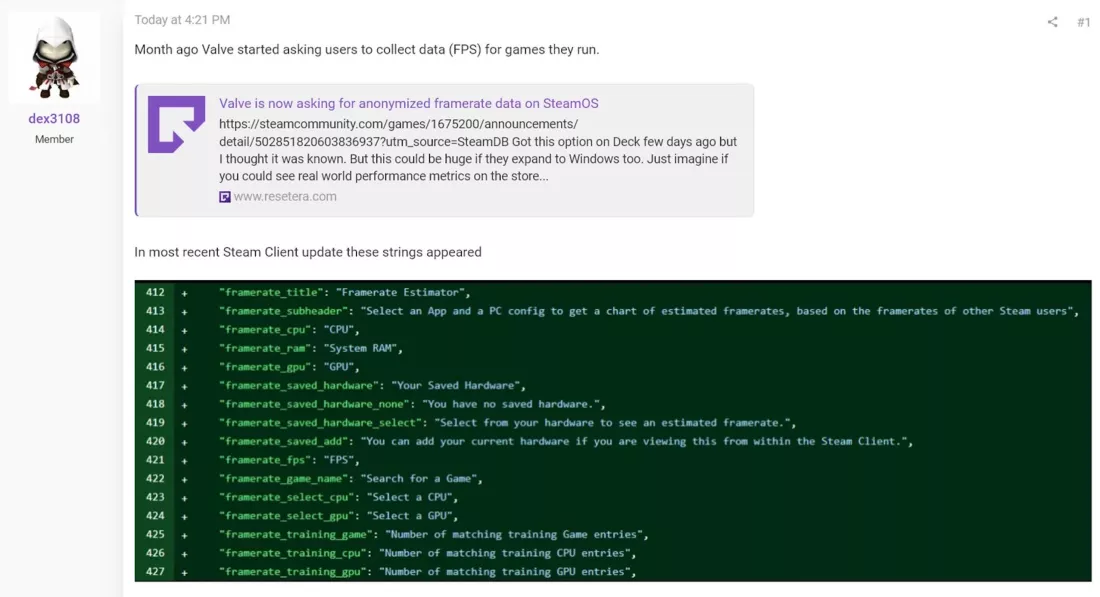
Steam is making anonymous fps data available to devs, so that they can see what kind of performance their game has on the Deck.

3
4


This game has looked very visually interesting to me, so it's great news to hear the devs are working on Deck compatibility

5
3
submitted 1 day ago* (last edited 3 hours ago) by anistorian@lemmy.world to c/steamdeck@sopuli.xyz


Hello fellow tinkers!

So I disassembled my Steam Deck to put in some ExtremeRate buttons. And after assembling it again I had no input on the volume buttons or any output/registered headphones from the jack.

So I bought a replacement audioboard and just switched it. Still no input or output. I checked the connections of the flex cable on the audioboard and it is good. The same for the connection under the heat sink on the motherboard. There is also no visible signs of kinks or tears in the cable.

So what am I missing ? Is there some hidden connection somewhere I can’t see that could have gotten loose ? I would really like to fix it myself if possible and not have it send in for repair.

Hope anyone can help !

Edit: My deck is the revised OLED, so it only has the one flex cable connecting the audioboard and the motherboard.

And for some reason the microphone still work. Which is weird since I thought the mic was connected via the same cable.

6
7


To be clear, the video isn't publicly viewable yet.

However steamdb was able to show that a video called "steam_controller_unboxing_2026" was uploaded on April 20th, 2026.

8


I am just wondering, what do you think the Steam controller is going to cost when it comes out?

9


To install, go to the decky store and add it.

I know a lot of people complain about getting 50 games added to the scheduled download list and having to click them all one by one, so this should be pretty nice.

10


A couple of times I have been playing something and was so deep in the game I didn't realize the battery was going down faster than I realized and the deck decided to turn off.

I have been thinking it would be nice for me to have the battery level visible even when running a game in full screen mode. I have an app on my phone with permission to display on top of other apps that draws a line around the camera cut out showing the battery charge level no matter what I am doing on the phone. In some older phone with no cutout I used to have a horizontal line in the top of the screen.

I would love to have this on the deck. Does anyone know if it exists? I've been searching with no result. If it doesn't exist, I wonder how difficult it would be to implement it... I have no clue how to have it display on top of everything though.

The image shows one of the old apps I used to have to do this on my phone.

11


An experimental steam deck plugin that works similarly to an iOS anti-motionsickness feature. Basically it shows dots on the edges of the screen, and moves those dots based on the deck's internal gyroscope to help your eyes have a movement reference.

The dev is also looking for feedback on how well it works, if you try it out you can submit feedback here or email the dev at astro@n0t.space

This is kinda niche, but it's the kind of thing that could be a big improvement for people with bad motion sickness issues, so I'm curious if it will work.

12


Great to see new releases running well on the Deck, and I've been hearing a lot of praise the last couple days for Pragmata specifically.

Note: the default graphics settings default to fsr 1, you'll have much better results switching to fsr 3.

13
14


This plugin makes some changes to the deck's WiFi settings that are supposed to significantly help with streaming quality. It's not on the decky store yet, so you have to manually install it.

Here's what it does:

  • Disables WiFi power management and PCIe power states that cause packet batching, latency spikes, and throughput degradation during sustained streaming.

  • Locks to your current access point so the Deck stops scanning for other networks every 2 minutes. Disable before switching networks or if you use a mesh/multi-AP setup and need to roam.

  • Installs a script that reapplies your settings every time WiFi reconnects - works even if Decky isn't running

  • Increases kernel buffer sizes and TX queue length to handle bursty streaming traffic without dropping packets

It also has some other features that can be toggled if needed, like forcing ipv4, forcing 5/6ghz, or using a different DNS.

15


I picked it up in it's case when I was leaving work, which turned out to not be zipped up, and it fell on a carpeted floor from maybe a couple of feet.

It seemed to work initially, but when I got home to play, I discovered that the LB button no longer works, the RB button only works on every second press, and the 'Steam' and '...' buttons just zoom on the screen but not bring up the relevant menus, and with further exploration they both seem to trigger the LB function.

I've restarted it, installed the latest update, and the problem persists. It's it fixable, or am I fucked?

16


Now we aren't talking magical improvements. But before the game ran at about 75% (20-25fps), now its more 95-100% (28-30fps). Turn off the frame charts and you wouldn't even notice.

17
18
19


Leaker here is Brad Lynch, who generally seems reliable as a leaker for Valve software and products. He was also the source for the leaked renders of the steam controller.

20
21
22
23
24
25


Wine is the base for Proton, which lets windows games run on the Deck.

The interesting bit here is the change to how DLLs are loaded. Currently with Wine and Proton, you do at times need to do a bit of a workaround for games that need specific DLLs for their mods. With this change now in place and shipped in Wine, it means that if the DLL company name attached is not Microsoft (so a custom one supplied with the mod or game), Wine will automatically use it over the Wine version.

Hopefully, the end result will be a number of mods for Windows games on Linux / SteamOS will be easier to run, often out of the box with no extra changes or launch options. And, eventually, Valve will pull the changes into Proton so everyone using it with Steam will see the benefits of it.

view more: next ›