this post was submitted on 24 Oct 2026
14 points (93.8% liked)

3DPrinting

24129 readers
56 users here now

3DPrinting is a place where makers of all skill levels and walks of life can learn about and discuss 3D printing and development of 3D printed parts and devices.

The r/functionalprint community is now located at: or !functionalprint@fedia.io

There are CAD communities available at: !cad@lemmy.world or !freecad@lemmy.ml

Rules

If you need an easy way to host pictures, https://catbox.moe/ may be an option. Be ethical about what you post and donate if you are able or use this a lot. It is just an individual hosting content, not a company. The image embedding syntax for Lemmy is ![](URL)

Moderation policy: Light, mostly invisible

founded 3 years ago
MODERATORS
 

I bought the assembled version of the Prusa core one+ (gen 2). Got through the setup and calibration until hitting a (literal) snag when attempting to calibrate the filament sensors.

The assembled printer is supposed to come with a bit of orange PLA filament already loaded, sticking out of the end near the spool holder. I can see the orange filament in the PTFE tube, but the bit that's supposed to stick out seems to have snapped off. Telling the printer to unload the filament doesn't do anything.

I'm coming from a BambuLab A1 Mini, so I'm very much in the printing side of the hobby and not the printer side of the hobby, and I get a bit lost when the first step seems to be to completely disassemble the business end of the printer.

top 11 comments
sorted by: hot top controversial new old
[–] earlier_riser@lemmy.world 2 points 3 days ago

Update: I removed the PTFE tube and Bowden tube from the extruder. the Filament broke right before entering the extruder. I tried pushing more filament through the feeder end but I'm meeting resistance at the same depth I was before. Now I guess I have to work on disassembling the filament sensor.

This printer cost me $1600 dollars shipped and I haven't even printed anything with it yet. It took me maybe half an hour between unboxing the A1 mini and printing my first benchy, and the a1 was I think $500 all in, and that's including the AMS lite. Over all I haven't had the best unboxing experience with the core one.

I haven't even mentioned that Prusa decided to use 2 different types of screws to hold the top plastic cover on the chassis, meaning I need to keep track of them and their two different hex keys.
[–] BillDaCatt@lemmy.world 3 points 4 days ago (2 children)

Can you manually heat up that hotend and then advance the feed while pushing in some new filament by hand? If you use a different color, you will be able to tell when the old color has been purged.

[–] earlier_riser@lemmy.world 1 points 4 days ago* (last edited 4 days ago) (1 children)

Can I do that without calibrating the filament sensors? Sorry if this is a stupid question.

[–] BillDaCatt@lemmy.world 4 points 4 days ago (1 children)

You should be able to. You will probably have to exit out of the calibration setup. but I don't expect that is much of a big deal.

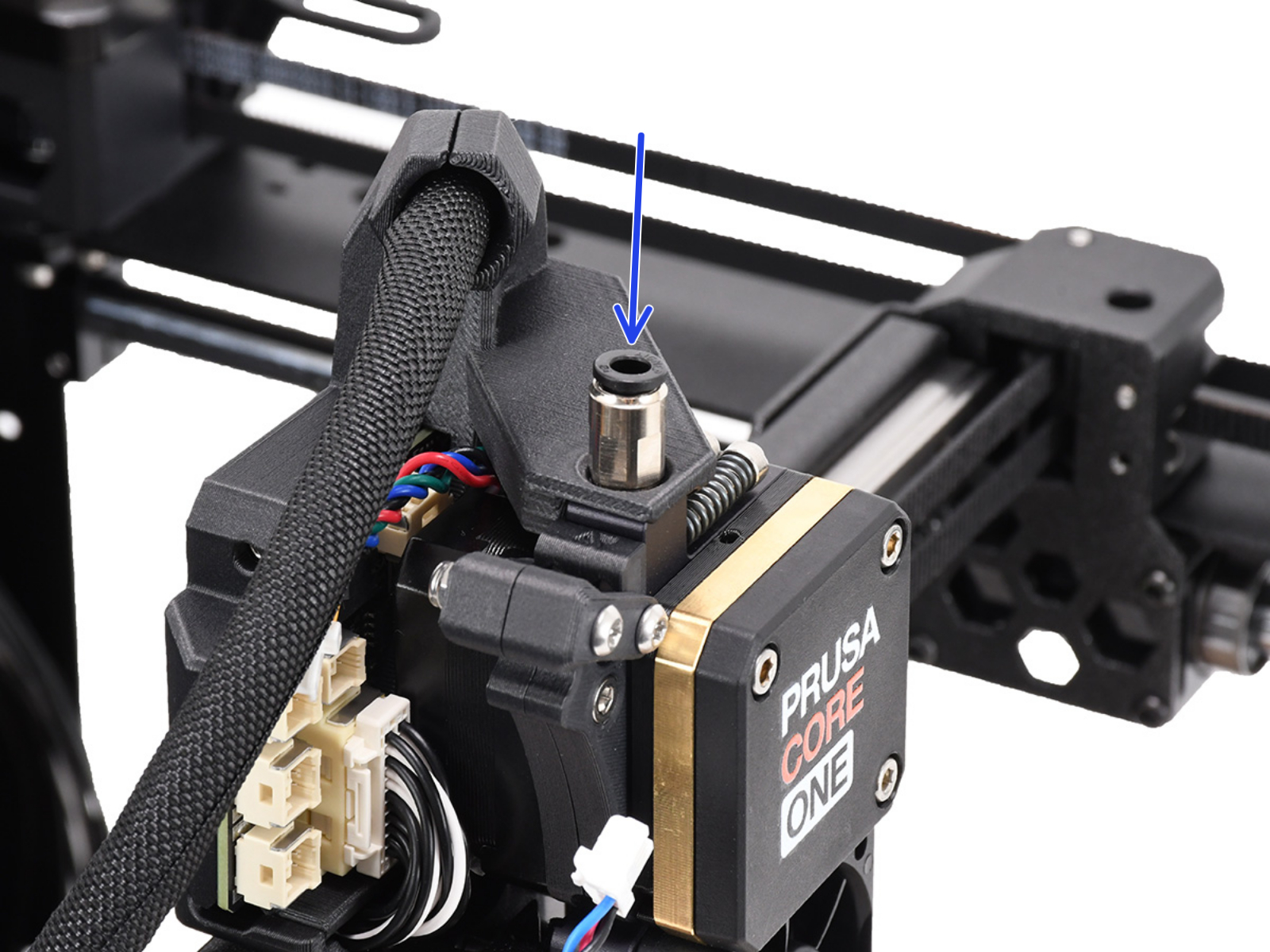
Also, after reading some of the other comments here, I would suggest looking closely where the Bowden tube enters the hotend. (see arrow in the linked picture) There is a fitting right there that will allow you to remove the tube. Push the black ring down and gently pull up on the tube. It should pull right out. Then it's a simple matter of, heating up the hotend, grab the broken filament with your fingers or a pair of pliers, and perform your filament removal step. Replace the tube once the filament has been removed.

[–] trailee@sh.itjust.works 1 points 4 days ago

This is a very good point that I neglected. The tube can be pushed in to connect, but must be carefully released from the fitting.

[–] Timpostma@mastodon.world -3 points 4 days ago

@BillDaCatt @earlier_riser bill does have a point when it comes to thermoplastic filament
What I think of it which melting points of each thermoplastic were used in degreee Celsius because that should be a good question
#3dprinting

[–] trailee@sh.itjust.works 2 points 4 days ago* (last edited 4 days ago) (3 children)

You can look through the assembly manual for the kit version, and find that the black 3d printed elbow that attaches the Bowden tube to the top of the hot end just slides right on. So you might need to undo a tie or two but it should be easy to pop that off and get the filament out.

[–] earlier_riser@lemmy.world 1 points 2 days ago

Update 2: I was able to get the PTFE tube out of the side sensor but I tore the collet out as well and it went flying. Against all odds I was able to find it, but now I have to see if I can reinsert it.

[–] earlier_riser@lemmy.world 1 points 2 days ago (1 children)

update: It looks like I need to detach the tube from the front sensor and I can't do that without removing the side panel which is riveted to the frame.

[–] trailee@sh.itjust.works 1 points 2 days ago

I’m not sure exactly what you’re saying but you certainly don’t need to drill out rivets to get to it.

I assume you’re talking about the sensor at the start of the tube. Assembly of that one is step 7.19 through 7.21, and attaching the body panel on that side is step 7.40 (maybe look back as early as 7.35 for the prep work).

You might also try talking to Prusa support.

[–] earlier_riser@lemmy.world 3 points 4 days ago

Thanks. Will take a look after I've had a full night's sleep.